
 Tracy Jackson15 yrs in online marketing
Pictory AI Review 2026: Pricing, Features, Pros & Cons
Table of Contents
You already wrote the blog post. Turning it into a video shouldn’t eat another weekend, and that’s exactly the job Pictory promises to handle for you.
In this Pictory AI review, I’ll show you what the tool really does, what it costs in 2026, and where it falls short. I’ve used it to turn my own blog posts into captioned, narrated videos, so this isn’t a spec-sheet rewrite.
The quick verdict:
- Best for: bloggers, marketers, and course creators who want short videos from content they’ve already written.
- Price: from $25 a month billed annually, with a free trial on the Starter, Professional, and Teams plans.
- Standout feature: paste a blog URL and get a scripted, captioned video draft without touching a timeline.
- Biggest catch: the automatic stock visuals can feel generic, so plan a quick human pass before you publish.
Disclaimer: If you buy something using the links in this article, I may receive a commission at no extra cost to you.
What Is Pictory AI?
Pictory AI is a cloud-based video creation and editing platform that turns text, scripts, blog posts, URLs, and presentations into polished videos. You don’t need to film anything or learn complex editing software. It’s built for content creators, marketers, educators, and faceless YouTube channels that want video without the editing timeline.
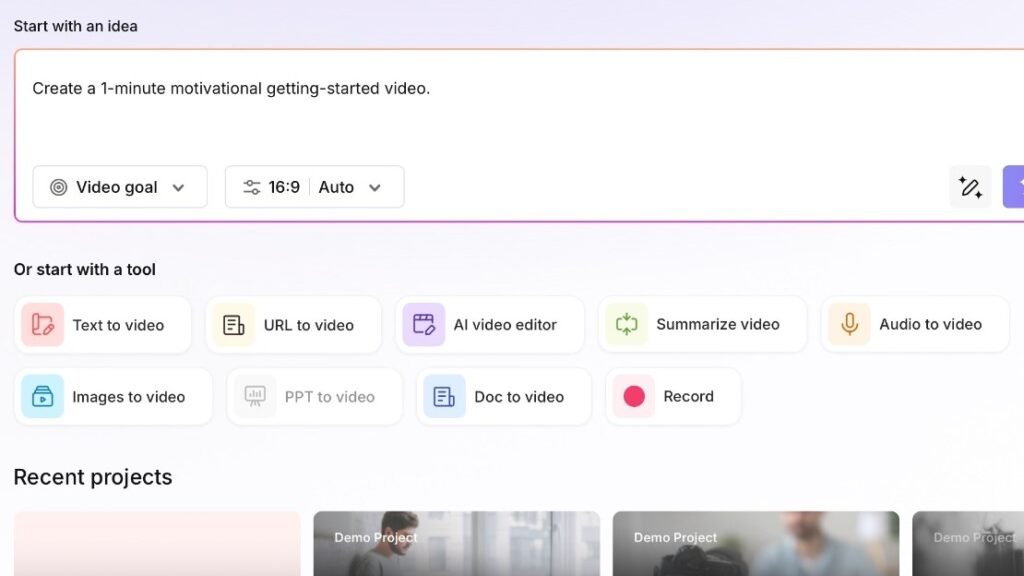
You start either from an idea or from a tool. The idea box writes a script for you from a one-line prompt, and the tool menu covers text, URLs, audio, images, slides, docs, and screen recording. Everything runs in your browser at app.pictory.ai, so there’s nothing to install.
Pictory AI Key Features
Pictory’s core features are text-to-video, URL-to-video, text-based video editing, an AI video agent called Pictory 3, a large stock library with AI voices, and automatic captions for repurposing long recordings. Together they cover the full path from a written idea to a captioned, branded video sized for any platform.
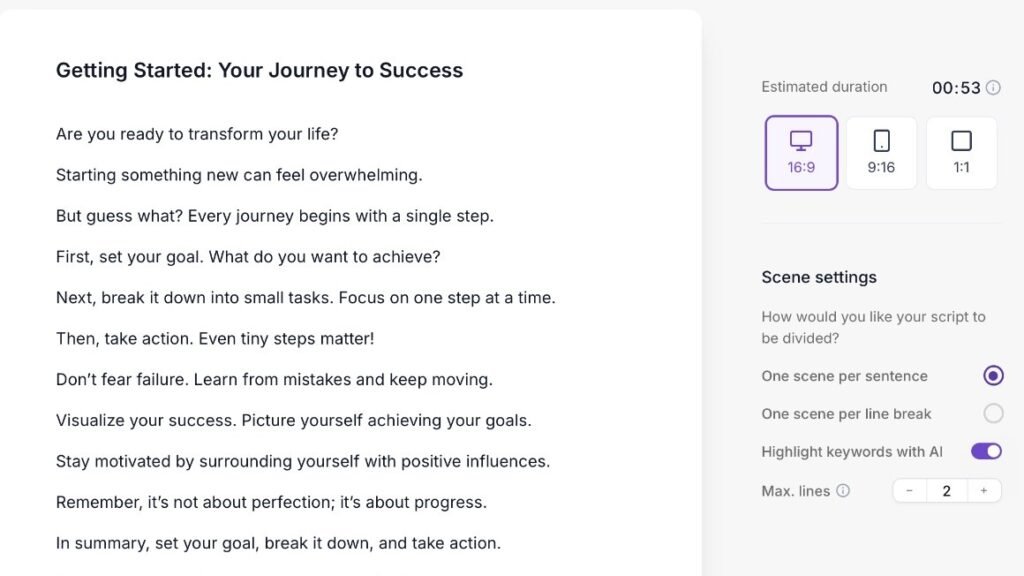
Text-to-video and script-to-video: paste a script or article, and Pictory splits it into scenes, matches each one with stock footage, adds captions, and lays music underneath. In the script editor, you choose one scene per sentence or one per line break.
URL-to-video: paste a blog post or web page link, and Pictory pulls out the key points and turns them into a short video summary.
Text-based video editing: Pictory transcribes your recording, so you edit the video by editing the text. Delete a sentence from the transcript, and it’s cut from the video.
Pictory 3 (AI video agent): describe your video goal, audience, and source material, and the agent builds a storyboard and preview you refine by chat. Pictory lists the AI video agent on every paid plan.
Stock library and voices: all plans include unlimited access to royalty-free videos from Getty Images and Storyblocks, with over 5 million on Starter and over 18 million from Professional up, according to Pictory’s pricing page (November 2026). You also get AI voiceovers in multiple languages.
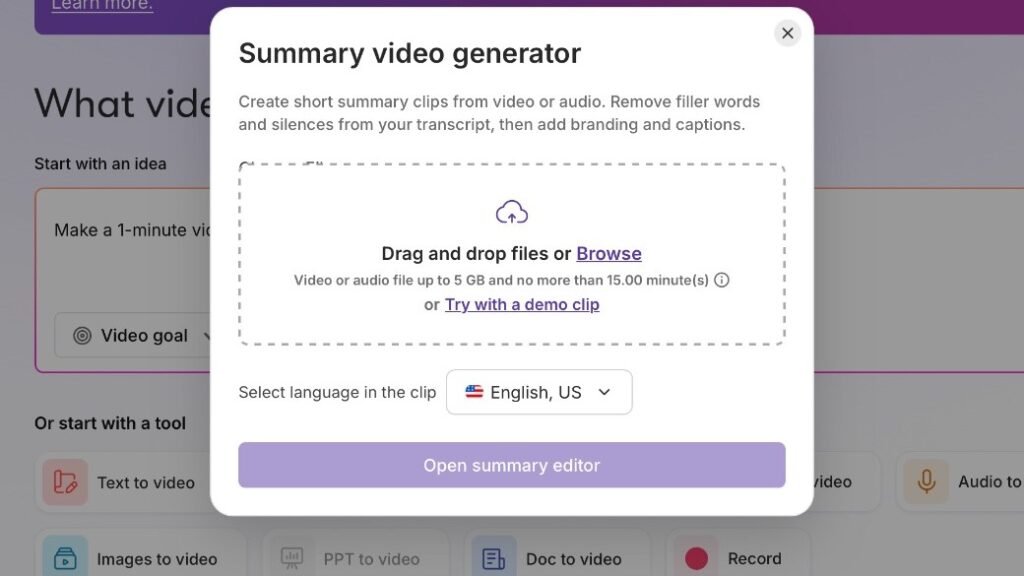
Repurposing and captions: the summary video generator takes a video or audio file up to 5 GB and 15 minutes long. It removes filler words and silences, then adds branding and captions so you can slice webinars and podcasts into short clips.
Formats and branding: every video exports in 16:9, 9:16, or 1:1, so one project covers YouTube, Reels, TikTok, and LinkedIn. Brand kits keep your logo, colors, and fonts consistent across videos.
How Pictory Works
Pictory works in three steps: give it a starting point, refine the script it builds, then pick your visuals and voice. The starting point can be a one-line idea, a script, a blog URL, a document, slides, audio, or images. You can go from first draft to export without touching a timeline.
Step 1: Start from an idea or a tool. Type a prompt like “Create a 1-minute getting-started video,” set your video goal and aspect ratio, and click Generate script. Or pick a tool such as Text to video or URL to video.
Step 2: Refine the script. The script editor shows an estimated duration and splits your text into scenes. Built-in AI buttons optimize, rephrase, shorten, lengthen, or change the tone, and Pictory can highlight keywords on screen automatically.
Step 3: Choose visuals and voice. From there, you move to video preferences to pick the voice, music, and branding, then swap any stock clips that miss the point. Export in the size each platform needs.
Pictory AI Pricing
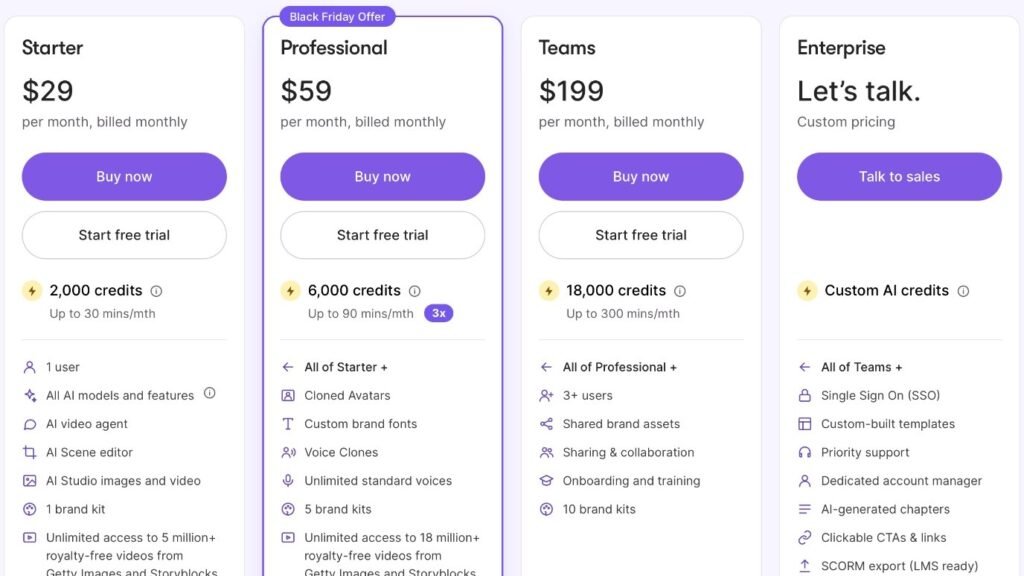
Pictory pricing starts at $25 a month billed annually, or $29 a month billed monthly, for the Starter plan, according to Pictory’s pricing page (November 2026). Professional is $59 a month, Teams is $199 a month, and Enterprise is custom. Starter, Professional, and Teams come with a free trial, but there’s no free plan.
Here’s how the plans compare, as listed on Pictory’s pricing page in November 2026:
| Plan | Billed monthly | Billed annually | AI credits | Video minutes | Notable extras |
| Starter | $29/mo | $25/mo | 2,000/mo | Up to 30/mo | 1 user, AI video agent, 1 brand kit, 5M+ stock videos |
| Professional | $59/mo | $29.50/mo (Black Friday offer) | 6,000/mo | Up to 90/mo | Voice clones, cloned avatars, custom fonts, 5 brand kits, 18M+ stock videos |
| Teams | $199/mo | $119/mo | 18,000/mo | Up to 300/mo | 3+ users, sharing and collaboration, 10 brand kits |
| Enterprise | Custom | Custom | Custom | Custom | SSO, SCORM export, dedicated account manager |
About that Professional price: the $29.50 annual rate is Pictory’s Black Friday offer of 50% off Professional annual plans, running in November 2026. Check the regular annual rate before you buy after the sale ends.
What credits mean: every plan runs on AI credits that cap how many minutes of video you can make. Starter covers up to 30 minutes a month, which suits a few short videos rather than a daily posting schedule.
Free trial, not a free plan: Starter, Professional, and Teams each have a “Start free trial” button, but Pictory doesn’t list a permanent free plan. Annual plans also include a consultation with Pictory’s video-creation expert, which Pictory values at $210.
Pictory AI Pros and Cons
Pictory’s biggest strengths are how easy it is to start, how much manual work it automates, and how easily one video adapts to every format. Its weaknesses are stock visuals that can feel generic, no dedicated mobile app, and AI voices that can sound flat next to a human narrator. Credit limits also cap the cheaper plans.
Pros
Beginner-friendly: the dashboard asks what you want to make and offers a starting tool for each content type. There’s no timeline to learn before your first video.
A real time-saver: scene splitting, B-roll selection, voiceovers, and captions are automatic. You review and adjust instead of building every scene by hand.
Multi-format support: one project exports in 16:9, 9:16, or 1:1. That covers widescreen YouTube, vertical Reels and TikTok, and square social posts.
Cons
Stock footage reliance: automatic visual picks can feel generic or miss the context of a sentence. Plan to swap a few clips by hand in every video.
No mobile app: Pictory has no official mobile app and runs in your browser instead, including your phone’s, according to Pictory’s mobile app notice (November 2026). Plan on doing your real editing on a laptop or desktop.
AI voice nuance: the AI voices are realistic, but they can lack the emotional range of a human narrator. Voice clones and cloned avatars only start on the Professional plan.
Plan limits: sharing and collaboration need the Teams plan at $199 a month, and SSO and SCORM export are Enterprise-only.
My Experience Using Pictory
I’ve used Pictory to create custom videos, turn my blog posts into videos, add closed captions, and use an AI avatar for voiceover. Those are the jobs Pictory is built for: repurposing written content and producing narrated, captioned video without filming. Pictory is a tested pick, not a research-based one.
The blog-to-video workflow is the one most bloggers will care about. You paste the post or its URL, Pictory drafts the scenes, and you edit from there instead of from a blank timeline.
Captions also help anyone who watches with the sound off, and Pictory adds them automatically. My guide on how to add captions to video covers other ways to do it.
Who Pictory Is (and Isn’t) For
Pictory is best for bloggers, marketers, course creators, and faceless YouTube channels that already have written content and want to turn it into video quickly. It’s a weaker fit if you need cinematic, custom-shot footage, a dedicated mobile app, or team collaboration on a small budget. In those cases, a different tool or plan will serve you better.
Good fit: you publish blog posts, newsletters, or scripts and want short videos from them. You care more about speed and consistency than film-quality visuals.
Poor fit: you need original footage, frame-by-frame control, or a native phone app. Small teams that need shared projects will hit the Teams paywall quickly.
If you’re building a video plan from scratch, my video marketing strategy guide covers what to make before you pick a tool.
Pictory Alternatives
The best Pictory alternatives depend on what you need. Fliki is a strong choice for text-to-video with lifelike AI voices, while Synthesia focuses on presenter-style videos with AI avatars. If you want to compare more options side by side, a broader AI video generator roundup is the better starting point.
Fliki: converts blog posts and scripts into videos with realistic AI voices. My Fliki review covers it in depth.
Synthesia: built around AI avatars that present your script on camera, which suits training and explainer videos. My Synthesia review goes through it.
Fliki and Synthesia are both research-based picks. For a wider comparison, see my roundup of the best AI video generator tools.
Using Pictory for Video SEO
Pictory can support SEO because its captions give search engines readable text about your video, and short videos can keep visitors on your pages longer. The tool won’t rank anything by itself, though. You still need a keyword-focused title and description, and you need to embed the video where it supports the page.
Publish with search in mind: give each video a title and description built around the keyword the page targets. Embed it on the matching blog post, not on a random page.
Repurpose, then promote: turn one long post into several short clips, and share them on social, email, and YouTube. Each clip points viewers back to the full article.
A Real-World Example
Pictory’s published case study on Leadsagna, a Canadian digital marketing agency, shows the blog-to-video workflow in practice. The agency used Pictory’s stock library and script-to-video tool to turn blog content into videos for YouTube, social media, and client landing pages. It’s Pictory’s own customer story, so treat the results as reported, not independently verified.
Leadsagna’s challenge is a common one: it couldn’t capture original footage from clients, and custom video production was too costly and complex. The team also needed a steady stream of platform-ready video to support its SEO work.
Pictory reports a 500% increase in budget efficiency and a 250% increase in reach for Leadsagna, according to Pictory’s Leadsagna case study (checked November 2026). Zoha Nekoofar, its Head of Content, put it this way: “We didn’t have a full-time video editor, and Pictory filled that gap completely.”
The pattern is the useful part. Take one long piece of content, cut it into short clips, and publish each clip where your audience scrolls.
Frequently Asked Questions
Is Pictory AI free?
No, Pictory AI doesn’t offer a permanent free plan. Its Starter, Professional, and Teams plans each come with a free trial, so you can test the editor before paying. After the trial, plans start at $25 a month billed annually or $29 a month billed monthly for Starter, according to Pictory’s pricing page.
How much does Pictory AI cost?
Pictory AI costs $29 a month for Starter, $59 a month for Professional, and $199 a month for Teams when billed monthly, according to Pictory’s pricing page in November 2026. Annual billing lowers Starter to $25 a month and Teams to $119 a month. Enterprise pricing is custom.
Is Pictory AI worth it?
Pictory AI is worth it if you already create written content and want to turn it into short videos quickly. It automates scenes, stock footage, voiceovers, and captions. It’s less worth it if you need original footage or heavy editing control, because its visuals rely on stock clips you’ll often swap by hand.
Can Pictory turn a blog post into a video?
Yes, Pictory can turn a blog post into a video through its URL-to-video tool. You paste the post’s link, Pictory pulls out the key points, builds scenes with stock footage and captions, and adds a voiceover. You can then edit the script, swap clips, and export in 16:9, 9:16, or 1:1.
Does Pictory AI have a mobile app?
No, Pictory AI doesn’t have an official mobile app. It runs in your web browser, including the browser on your phone, so there’s nothing to download. Pictory warns that apps in the Apple App Store or Google Play claiming to be Pictory aren’t affiliated with it and may be scams.
What is the best alternative to Pictory?
The best Pictory alternative depends on your goal. Fliki suits text-to-video with natural-sounding AI voices, while Synthesia suits presenter-style videos led by AI avatars, and both turn scripts into video without filming. Compare their current plans and output quality against Pictory’s before committing to an annual subscription.
The Bottom Line
Pictory is one of the quickest ways I know to turn written content into video. It handles the busywork of scenes, stock footage, voiceovers, and captions, and it exports in every format you need.
Go in knowing the limits: stock visuals need a human pass, and the cheaper plans cap your minutes. Start with the free trial, run one of your best blog posts through it, and decide from the result.
Sources
Pictory: pricing plans (checked November 15, 2026)
Pictory: there is no official Pictory mobile app (checked November 15, 2026)

Recent Posts
Monday.com Review 2026: Is It Still the Best Work OS?
I tested Monday.com against ClickUp, Asana, and Wr...
Updated July 27, 2026

AI Writing Software for Blogging in 2026: Best Tools + How to Stay AI-Search Vis...
The best AI writing software for blogging in 2026 ...
Updated July 20, 2026
HubSpot Review 2026: Is It Worth the Cost?
I tested HubSpot’s free CRM, Starter, and Pr...
Updated July 20, 2026
Teamwork.com Review 2026: Is It the Best PM Tool for Client Work?
I tested Teamwork.com for agency and client projec...
Updated May 29, 2026
Wrike Review 2026: Is It Worth the Cost?
I tested Wrike in real enterprise workflows. Here&...
Updated May 29, 2026
Asana Review 2026: Is It Worth It? (Honest, In-Depth Analysis)
I tested Asana across real team workflows. Here...
Updated May 29, 2026
Newsletter
Don't miss a thing!
Sign up to receive daily news