

 Tracy Jackson15 yrs in online marketing
HubSpot for Nonprofits: 40% Discount, Eligibility & What It Actually Costs (2026)
Table of Contents
The short answer: HubSpot offers a 40% discount on Professional and Enterprise tier products for eligible nonprofits — but two qualifiers matter before you spend any time applying. First, the discount does not apply to Starter plans. Second, the program is currently available only to nonprofits located and registered in North America, Australia, or New Zealand. It’s a pilot, and broader rollout has not been confirmed.
I cover the best software for nonprofits across five categories, and HubSpot for nonprofits is the most searched topic in this cluster.
HubSpot Free CRM is genuinely useful for small nonprofits, and the 40% discount on Professional makes a platform that usually feels out of reach actually affordable.
But this is the article where I need to tell you what most competing guides skip: the geographic restriction, the Starter exclusion, and a hidden cost layer that shows up after you sign.
I’ll walk through all four decisions you need to make before applying.

What Is HubSpot for Nonprofits?
HubSpot’s Nonprofit Program gives eligible organizations 40% off Professional and Enterprise tier products — Marketing Hub, Sales Hub, Service Hub, Content Hub, Operations Hub, whichever your team needs.
Here’s the thing: the free CRM is completely separate from this program.
HubSpot Free CRM is available to everyone — no application, no geographic restriction, no annual commitment. Contact management, email marketing, forms, deal pipelines, basic reporting.
The nonprofit discount is a separate track for organizations that need Professional or Enterprise features on top of that.
The two qualifiers I opened with are worth repeating: the discount is Professional and Enterprise only — Starter means full price.
And the program is limited to North America, Australia, and New Zealand. If your org is outside those regions, the discount isn’t available to you yet.
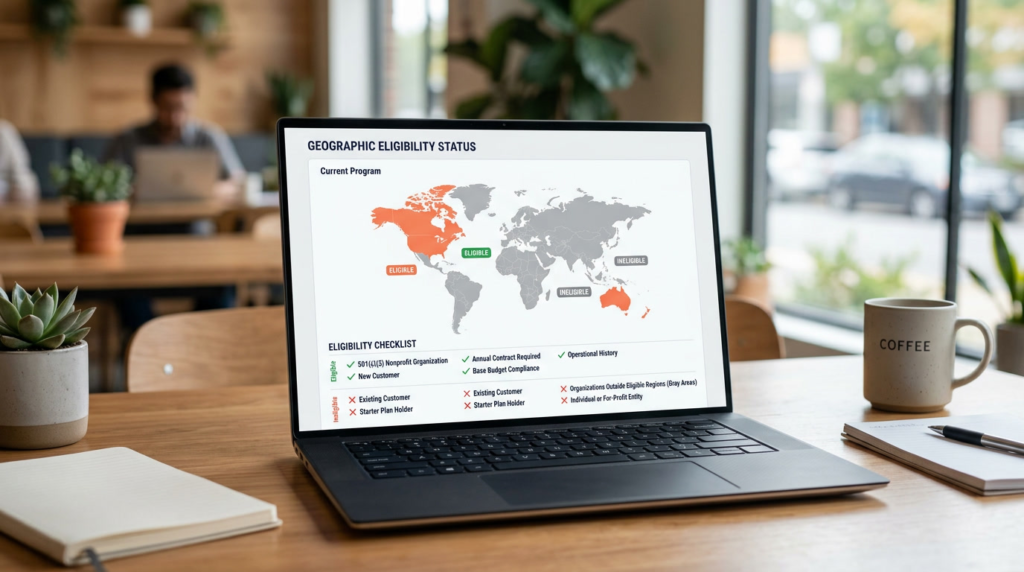
Who Qualifies for the HubSpot Nonprofit Discount?
Geographic eligibility — the restriction most articles miss
Start here before anything else — it’s the qualifier that kills the most applications.
The HubSpot Nonprofit Program is currently available only to nonprofits located and registered in North America, Australia, or New Zealand.
HubSpot describes this as a pilot, with broader rollout planned but not confirmed as of May 2026.
If your organization is registered in the UK, EU, Asia, Africa, or Latin America — the discount isn’t available to you yet.
Check hubspot.com/nonprofits for any updates before investing time in the application.
Organisation type requirements
To qualify:
- Located and registered as a nonprofit in North America, Australia, or New Zealand
- New HubSpot customer — discount applies to net-new Professional or Enterprise products only
- Annual term contract required (1-year subscription)
- Must meet HubSpot’s nonprofit eligibility criteria at hubspot.com/nonprofit-eligibility-criteria
What disqualifies you: Starter users and existing customers
Two disqualifiers I haven’t seen explained clearly in any competing article.
If you’re already on HubSpot Starter: You can’t apply the nonprofit discount to that subscription. The discount is for net-new Professional or Enterprise products only.
If you later purchase Professional as a new product, you can apply at that point — but your existing Starter plan can’t be converted.
If you’re already a HubSpot customer at any level: The discount can’t be applied to existing subscriptions.
Free CRM users upgrading to Professional are treated as a net-new purchase and are eligible. Existing paid plan holders are not.
The offer can’t be stacked with any other discount.
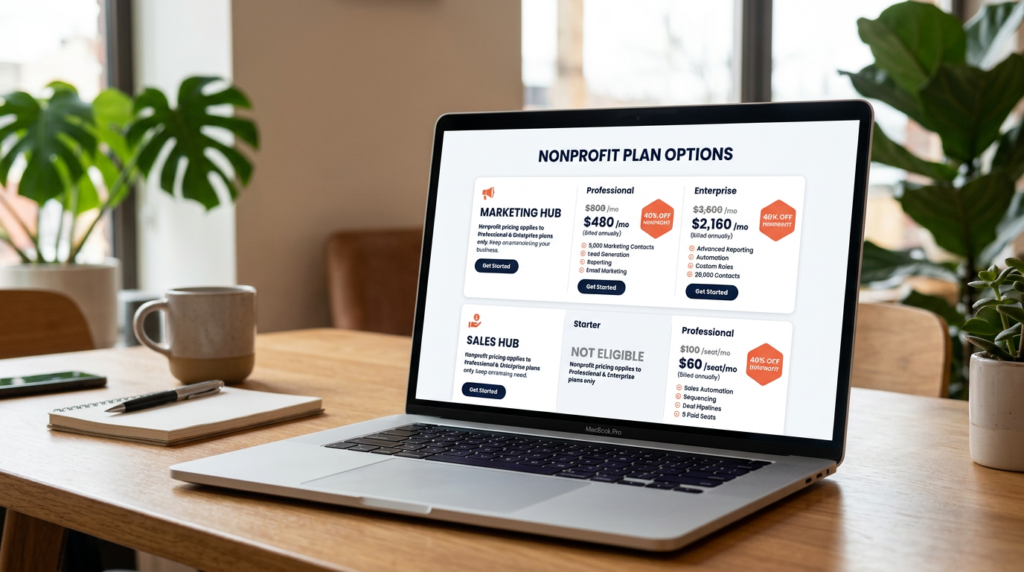
HubSpot Nonprofit Pricing: What You Pay After the 40% Discount
No competing article shows this with verified figures by hub.
HubSpot’s pricing varies by product — here’s the breakdown for the two most relevant to nonprofits.
Marketing Hub
| Plan | Standard price (annual) | Nonprofit price (annual, 40% off) | Notes |
| Free | $0 | $0 (no discount needed) | No application required |
| Starter | $9/seat/month | Not eligible for discount | Full price applies |
| Professional | $800/month | ~$480/month (40% off) | 3 seats + 2,000 contacts included; additional seats $45/mo |
| Enterprise | $3,600/month | ~$2,160/month (40% off) | 5 seats + 10,000 contacts included; additional seats $75/mo |
Sales Hub
| Plan | Standard price (annual) | Nonprofit price (annual, 40% off) |
| Free | $0 | $0 (no discount needed) |
| Starter | $15/seat/month (annual) | Not eligible for discount |
| Professional | $100/seat/month | ~$60/seat/month (40% off) |
| Enterprise | $150/seat/month | ~$90/seat/month (40% off) |
Prices verified May 2026 from hubspot.com/pricing. 40% nonprofit discount applies to Professional and Enterprise tiers only. New customers on annual term contracts only. Geographic restrictions apply — North America, Australia, and New Zealand only as of May 2026. Discount cannot be stacked with other offers. Subject to change — confirm at hubspot.com/nonprofits before applying.
For how HubSpot compares against other CRM options at nonprofit pricing, see how nonprofit CRM pricing compares.
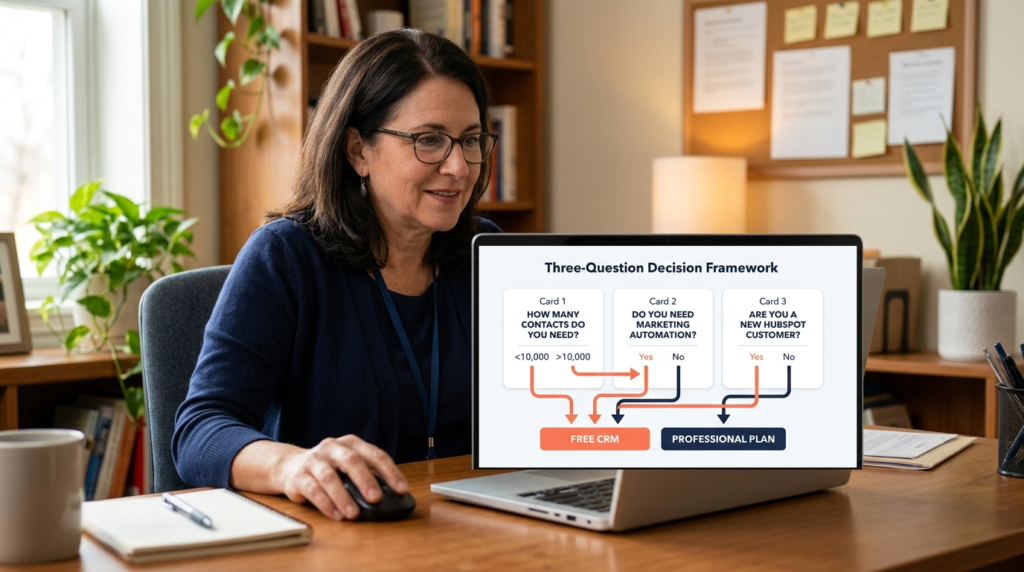
Do You Actually Need the Paid Plan? A 3-Question Framework
Most small nonprofits don’t actually need the paid plan. Here’s how to figure out quickly where you stand.
Question 1: How many contacts do you need to manage?
- Under 1,000 contacts with basic email needs → the Free CRM is sufficient
- Over 1,000 contacts, or needing email segmentation and automated sequences → Professional with the discount is the right tier
Question 2: Do you need marketing automation?
- Basic email blasts and contact management → Free CRM handles this
- Automated donor journeys, workflow triggers, lead scoring, A/B testing → Professional is required; the 40% discount makes this tier meaningfully more accessible
Question 3: Are you a new HubSpot customer?
- If yes and you qualify geographically → apply for the Professional discount before purchasing anything
- If you already have a Starter subscription → you can’t apply the nonprofit discount to that plan; you’d need to purchase Professional as a new product
- If you’re currently on the free CRM → your upgrade to Professional counts as a net-new purchase and qualifies for the discount
My honest take: For most small nonprofits with under 1,000 contacts and basic email needs, the free CRM is the right starting point.
Start with HubSpot Free CRM → The 40% discount on Professional is worth applying for the moment your team’s needs outgrow it — and that moment comes sooner than most people expect.
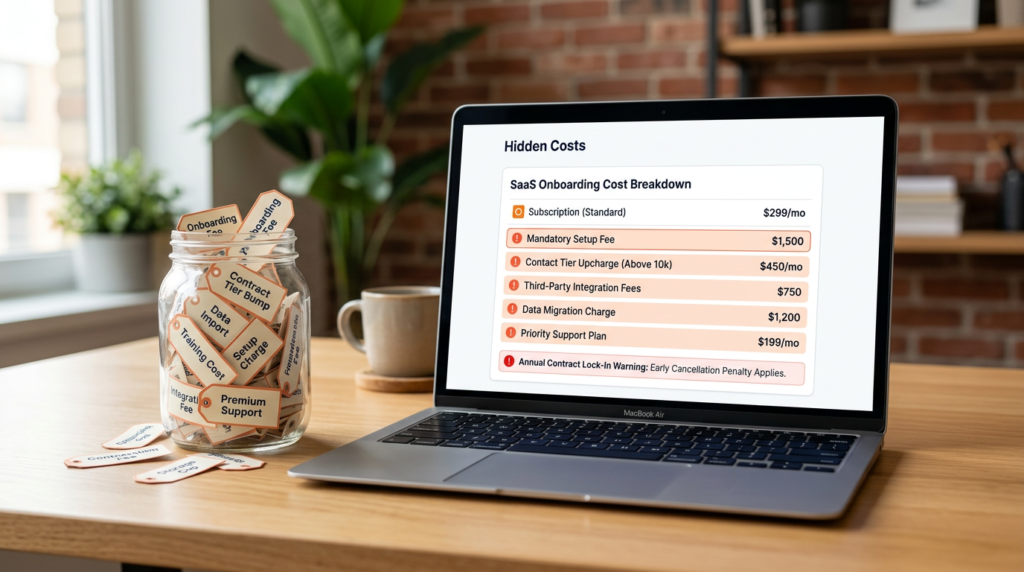
Hidden Costs to Budget For Before You Apply
This is the section no competing article covers properly.
The 40% discount is real — but there’s a cost layer sitting underneath it that matters if your nonprofit is on a tight budget.
- Mandatory onboarding fees: Not covered by the nonprofit discount. Marketing Hub Professional: $3,000. Marketing Hub Enterprise: $7,000. Sales Hub Professional: $1,500. Sales Hub Enterprise: $3,500. These land at the start of your first annual term — not spread out. Verify current fees at hubspot.com/pricing before signing.
- Integration costs: Connecting HubSpot to donation platforms (Donorbox, Classy, Bloomerang) may require third-party tools or custom development. Some integrations are free via the HubSpot App Marketplace; others carry their own fees. Check before assuming anything is included.
- Contact tier pricing (Marketing Hub): Pricing scales with contact count. Professional includes 2,000 marketing contacts; Enterprise 10,000. Cross those thresholds and you start paying more. Check your donor database size against these limits before picking a plan.
- Annual contract lock-in: Monthly billing isn’t an option under this program. Annual term only. Read the cancellation terms before signing — not after.
How to Apply for the HubSpot Nonprofit Discount: Step by Step
- Confirm geographic eligibility. Verify your organization is registered in North America, Australia, or New Zealand. If not, check hubspot.com/nonprofits for updates on the pilot rollout before going any further.
- Confirm you are a new HubSpot customer for Professional or Enterprise. The discount applies to net-new products only. If you have an existing Starter subscription, you can’t apply the discount to it.
- Go to hubspot.com/nonprofits. Navigate to the nonprofit program page — not the standard pricing page or the free signup page.
- Complete the sales enquiry form. Under “What are you hoping to learn?” explicitly state you’re interested in the HubSpot for Nonprofits Program and include your nonprofit registration details. If you don’t mention the nonprofit program, the enquiry routes as a standard sales contact.
- Wait for HubSpot confirmation. HubSpot confirms eligibility and calculates your discounted pricing. Approval takes up to 7 business days.
- Review and sign the annual contract. Annual term only — no monthly option. Review the cancellation policy before you sign, not after.
Apply for the HubSpot Nonprofit Discount → hubspot.com/nonprofits
Approval takes up to 7 business days. Available for new Professional and Enterprise customers in North America, Australia, and New Zealand only.

Is HubSpot Worth It for Nonprofits?
For nonprofits that have genuinely outgrown the free CRM and need marketing automation, yes — at the discounted rate, the case is strong.
Marketing Hub Professional at ~$480/month gets you workflow automation, A/B testing, social media management, and detailed campaign reporting.
For a nonprofit running active donor outreach at scale, that’s a real toolkit.
For small nonprofits with basic needs, I’d push back on anyone trying to sell you into a paid plan before you’ve hit the ceiling on the free tier.
Unlimited contacts, deal pipelines, email marketing, forms, meeting scheduling — all at zero cost. Most nonprofits haven’t maxed that out yet.
The caveats are real. HubSpot is complex, the onboarding fees aren’t discounted, and the contact-tier pricing on Marketing Hub can quietly eat into your budget as your donor database grows.
It’s not the right tool for a two-person team that needs to be up and running in a day.
I’ve covered CRM tools for growing teams in depth — several of those platforms have nonprofit-relevant pricing and a much lighter implementation lift.
Frequently Asked Questions
Is HubSpot free for nonprofits?
HubSpot Free CRM is free for all organizations including nonprofits — no application required, no geographic restriction.
For paid Professional and Enterprise plans, eligible nonprofits in North America, Australia, and New Zealand can apply for a 40% discount. Starter plans are not eligible.
The free CRM includes contact management, email marketing, forms, and basic reporting.
What is the HubSpot nonprofit discount?
The HubSpot nonprofit discount is 40% off Professional and Enterprise tier products.
After the discount: Marketing Hub Professional runs approximately $480/month (base, 3 seats and 2,000 contacts included); Sales Hub Professional approximately $60/seat/month.
Starter plans are excluded. Available to new customers on annual contracts in North America, Australia, and New Zealand only as of May 2026.
Cannot be stacked with other offers.
How do I apply for HubSpot for nonprofits?
Go to hubspot.com/nonprofits and complete the sales enquiry form.
Under “What are you hoping to learn?” explicitly state your interest in the HubSpot for Nonprofits Program and include your nonprofit registration details.
HubSpot confirms eligibility and calculates discounted pricing. Approval takes up to 7 business days. The full six-step process is in the section above.
Is HubSpot good for nonprofits?
Yes, with scoping. The free CRM is strong for contact and donor management at zero cost.
The discounted Professional plan makes marketing automation genuinely accessible — workflow automation, donor segmentation, campaign reporting.
The caveats: complex setup, onboarding fees not covered by the discount, and contact-tier costs that scale.
Not the right fit for small teams with basic needs. The plan decision framework above is the fastest way to figure out which tier you need.
Does HubSpot have a CRM for nonprofits?
Yes.
HubSpot Free CRM includes contact management, email marketing, forms, and basic reporting at no cost, and is widely used by nonprofits for donor outreach and communications.
It’s not a purpose-built donor management platform — no native donation processing, fund accounting, or grant tracking.
For a direct comparison of discount programs across tools, see the monday.com nonprofit program as an alternative if CRM complexity is a concern.
Sources

Recent Posts
Monday.com Review 2026: Is It Still the Best Work OS?
I tested Monday.com against ClickUp, Asana, and Wr...
Updated July 27, 2026

AI Writing Software for Blogging in 2026: Best Tools + How to Stay AI-Search Vis...
The best AI writing software for blogging in 2026 ...
Updated July 20, 2026
HubSpot Review 2026: Is It Worth the Cost?
I tested HubSpot’s free CRM, Starter, and Pr...
Updated July 20, 2026
Teamwork.com Review 2026: Is It the Best PM Tool for Client Work?
I tested Teamwork.com for agency and client projec...
Updated May 29, 2026
Wrike Review 2026: Is It Worth the Cost?
I tested Wrike in real enterprise workflows. Here&...
Updated May 29, 2026
Asana Review 2026: Is It Worth It? (Honest, In-Depth Analysis)
I tested Asana across real team workflows. Here...
Updated May 29, 2026
Newsletter
Don't miss a thing!
Sign up to receive daily news