

 Tracy Jackson15 yrs in online marketing
Best Software for Nonprofits in 2026: A Buyer’s Guide by Budget
Table of Contents
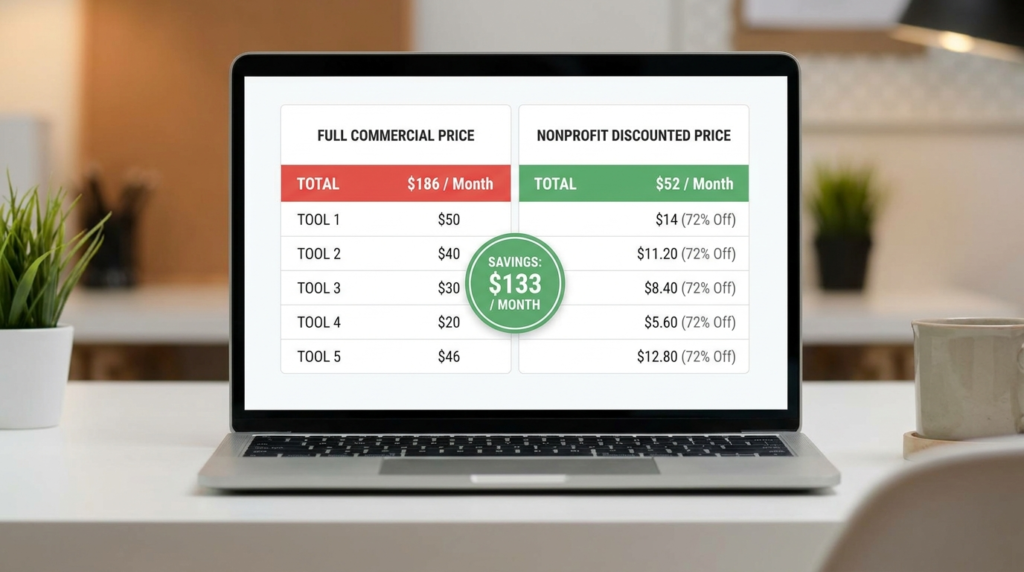
The short answer: The best nonprofit software stack for a five-person organization costs about $52/month after verified nonprofit discounts — compared to $186/month at full commercial pricing. That gap exists because most nonprofits aren’t applying for the discount programs that are sitting right there waiting for them.
Most nonprofits in the US run on budgets under $500,000 a year. According to the National Council of Nonprofits, that’s 88% of registered nonprofits in the country.
Commercial SaaS pricing wasn’t built for that reality — and yet the same platforms charging $25/seat/month to businesses will cut that price by 40–85% for a verified 501(c)(3).
The problem isn’t that the discounts don’t exist. The problem is that nobody’s explaining how to actually get them.
That’s what this guide does.
I’ve tested and reviewed the best software for nonprofits across five categories — CRM, project management, communication, productivity, and email — and I’ve verified the current nonprofit discount for each one.
You’ll find the actual post-discount pricing, not the headline commercial rate, and a full stack cost breakdown showing what a five-person nonprofit pays per month after applying every available program.
One thing worth saying upfront: most “best nonprofit software” lists are written by the vendors themselves. Bloomerang ranks Bloomerang first. Aplos ranks Aplos first.
I don’t have a platform to sell. I test these tools and tell you what I actually think, including where they fall short.
For a broader look at how these tools perform as general business platforms, I’ve covered project management software for teams and CRM tools for B2B teams in depth elsewhere on the site.

How I Chose These Tools (And Why Vendor Lists Don’t Tell the Full Story)
Every tool in this guide had to clear two bars to make the list as a primary recommendation.
First: a formal nonprofit discount program. I mean an actual application process, verified eligibility, and a confirmed discount applied to a paid plan.
Tools that only offer a free tier with no upgrade path aren’t primary recommendations here. Tools with a vague “contact us for nonprofit pricing” and no published program aren’t primary recommendations either.
Second: I’ve actually used or evaluated the platform. Everything here is based on hands-on testing, not vendor briefings or affiliate relationships.
A few well-known platforms — Bloomerang, Givebutter, Bonterra, Zeffy — are built specifically for nonprofit fundraising and donor management. They’re solid tools in that niche, and I mention them in the CRM section.
But this guide is focused on the operational stack: the tools nonprofits use to manage projects, communicate, store documents, and run day-to-day work.
That’s where the discount programs are most underutilized, and where most small nonprofits are doing their shopping.
Here’s a quick overview of what’s covered:
| Category | Best tool (small NP, under $100K) | Best tool (mid NP, $100K–$500K) | Nonprofit program? |
| CRM / Donor management | HubSpot Free CRM | HubSpot Starter (40% off) | Yes — application required |
| Project management | Asana Personal (free) | Asana Starter (50% off) | Yes — application required |
| Communication | Slack Free → Pro (free ≤250 members) | Slack Pro (free ≤250 members) | Yes — application required |
| Productivity / Docs | Notion Free | Notion Plus (50% off) | Yes — application required |
| Email / Workspace | Google Workspace (free nonprofit tier) | Google Workspace (free nonprofit tier) | Yes — application required |

Best Nonprofit CRM Software
A nonprofit CRM isn’t the same thing as a sales CRM. You’re not tracking deals and pipeline stages — you’re managing donor relationships, volunteer records, grant applications, and program contacts.
The right tool depends on which of those functions matters most to your organization.
Best nonprofit CRM for small organisations (under $100K budget)
At this budget level, the goal is free or as close to it as possible, without gutting the core features your team actually needs.
HubSpot Free CRM is the strongest option here. The free tier includes unlimited users, unlimited contact and company records, deal pipelines, email tracking, meeting scheduling, and live chat — no credit card required.
For a small nonprofit currently managing donor records in a spreadsheet, the free HubSpot CRM is a real upgrade, not a watered-down demo.
Here’s the thing: the limitations kick in the moment you need automation. Want to send a thank-you sequence automatically after someone donates? That’s behind the paywall.
For basic donor record management and contact tracking, though, the free tier genuinely delivers.
Salesforce NPSP (Nonprofit Success Pack) is worth flagging here too. Salesforce offers 10 free seats to eligible nonprofits through the Power of Us program, accessed via TechSoup.
It’s purpose-built for nonprofit operations — donor management, grant tracking, program delivery — and the feature set at zero cost is substantial.
The honest tradeoff: Salesforce has a steep learning curve, and without dedicated admin support, small nonprofits often find it more tool than they can actually use.
If you have someone on staff who can manage the implementation, the Power of Us program is worth a serious look.
For most small nonprofits, I’d start with HubSpot Free and move to Salesforce NPSP only if your team has the internal capacity to implement it properly.
See the full how nonprofit CRM pricing compares across platforms.
Best nonprofit CRM for growing organisations ($100K–$500K budget)
Once you need automation — email sequences, task triggers, pipeline workflows — you’re looking at paid plans.
This is where HubSpot’s nonprofit discount starts doing real work.
HubSpot Starter at 40% off runs $9/seat/month at commercial pricing, which drops to approximately $5.40/seat/month after the nonprofit discount.
For a five-person team, that’s around $27/month — less than a single seat at commercial rates for most mid-tier CRMs.
The discount applies to all paid HubSpot plans, not just Starter.
Worth flagging for growing organizations: if you ever need HubSpot Professional (marketing automation, advanced workflows, better reporting), the 40% discount on a $90/seat plan is a much bigger dollar saving than it is at the Starter tier.
Eligibility restrictions to know: HubSpot’s nonprofit discount is currently limited to organizations registered in North America, Australia, and New Zealand.
It’s available to new customers only — you can’t apply it to an existing subscription, and it can’t be stacked with other offers.
See the full HubSpot for Nonprofits discount guide.

Best Project Management Software for Nonprofits
Project management is where the nonprofit discount programs are arguably the most generous.
Three of the major platforms — Asana, Monday.com, and ClickUp — all offer verified programs with meaningful savings on paid plans.
Asana for Nonprofits: what the discount program gets you
Asana’s nonprofit program offers 50% off Starter and Advanced annual plans for verified 501(c)(3) organizations. That’s one of the largest verified discounts in this category.
At commercial pricing, Asana Starter runs $10.99/user/month billed annually.
After the nonprofit discount, that’s approximately $5.50/user/month — comparable to ClickUp’s commercial Unlimited plan pricing, but with Asana’s cleaner interface and more reliable workflow automation at this tier.
What Asana Starter gets you: Timeline and Gantt views, unlimited workflow automations, project dashboards, custom fields, and forms.
For a nonprofit managing grant applications, fundraising campaigns, or program delivery across a small team, Starter covers most of what you actually need.
The application runs through Goodstack (formerly Percent). You’ll need your 501(c)(3) documentation and typical approval time is 1–2 days.
Eligibility note: Hospitals and hospital auxiliaries are not eligible. Organizations that don’t align with the anti-discrimination policies of Asana’s third-party reviewers may also be excluded.
See the full Asana for Nonprofits discount guide.
Monday.com for Nonprofits: what the discount program gets you
Monday.com’s nonprofit program is structured differently from most. For small teams, it offers 10 free Pro seats — not a discount on a paid plan, but an actual free allocation of their Pro tier.
Additional seats beyond the first 10 run at 70% off. Enterprise is available at a 33% discount.
This makes Monday.com particularly strong for small nonprofits that need a visual, flexible tool and want to avoid monthly costs entirely while keeping their headcount under 10.
The platform is more visually oriented than Asana — it’s built around boards and dashboards, which some teams find more intuitive, especially for non-technical staff.
The tradeoff is that it’s less purpose-built for complex project dependencies and deep workflow automation than Asana at the equivalent tier.
See the full Monday.com for Nonprofits discount guide.
ClickUp for Nonprofits: what the discount program gets you
ClickUp offers approximately 35% off paid plans (Unlimited and Business) for verified 501(c)(3) organizations.
Unlike Asana and Monday.com, ClickUp doesn’t publish a fixed nonprofit rate — the discount is handled directly through their sales team after you submit an application with your nonprofit documentation.
That means you won’t find a public-facing program page with a hard percentage.
The 35% figure is widely cited and consistent across multiple sources, but reach out to ClickUp directly to get a confirmed quote for your organization.
What makes ClickUp worth considering: it’s one of the most feature-dense platforms at its price point, and the Free Forever plan is genuinely usable for small nonprofits — unlimited members, unlimited tasks, and enough core features to run basic project management without ever upgrading.
See the full ClickUp for Nonprofits discount guide.

Best Communication Tools for Nonprofits
Slack for Nonprofits: 85% off, verified
Slack’s nonprofit program is one of the most straightforward and generous in the SaaS space. Here’s how it breaks down:
- Workspaces with 250 or fewer members: Free upgrade to the Pro plan. Zero cost.
- Workspaces with more than 250 members: 85% off Pro or Business+ plan.
For most small-to-mid-size nonprofits, the free Pro upgrade is the relevant offer. Slack Pro at commercial pricing runs $7.25/user/month billed annually.
For a 10-person nonprofit team, that’s $870/year at list price — reduced to $0 under the nonprofit program.
What the Pro plan includes: unlimited message history, unlimited app integrations (2,600+ apps), group video calls up to 50 participants, workflow automations, and 24/7 support.
For day-to-day team communication, that’s the full feature set most nonprofits need.
The application runs directly through Slack — no TechSoup verification required, though TechSoup validation is used in some regions.
Eligibility requires valid charitable status with the IRS (for US orgs), a local charity commission, or a TechSoup Global partner. Schools, hospitals, and political organizations are not eligible.
See the full Slack for Nonprofits discount guide.
Best CRM for Nonprofits (Donor Management Focus)
There’s a distinction worth making between general-purpose CRMs and donor management platforms.
The tools above — HubSpot, Salesforce — work well for nonprofit operations broadly.
This section addresses the donor relationship use case specifically: tracking giving history, managing campaigns, processing donations, and running grant workflows.
HubSpot for Nonprofits: 40% discount on paid plans
I already covered HubSpot as a general CRM above, but it’s worth addressing the donor management use case directly. HubSpot’s free CRM handles basic donor contact records well.
Where it falls short for nonprofits is in donation processing and fundraising-specific workflows — those require third-party integrations or a move to a purpose-built platform.
If your primary need is managing relationships with a few hundred donors and you want automation for follow-up communications and segmentation, HubSpot Starter with the 40% nonprofit discount is a cost-effective option.
If you’re processing online donations, running campaigns, and need native giving tools, look at a purpose-built platform alongside it — not instead of it.
Free CRM options for nonprofits under $100K
Two options worth knowing:
HubSpot Free CRM — unlimited users, unlimited contacts, deal pipelines, email tracking, live chat. No time limit. Limitations are in automation and advanced reporting, as covered above.
Salesforce NPSP via Power of Us — 10 free seats for eligible nonprofits through TechSoup. Purpose-built for donor management, grant tracking, and program delivery.
Higher implementation overhead than HubSpot, but significantly more powerful for dedicated nonprofit operations.
For most small nonprofits, HubSpot Free is the faster path to value.
For nonprofits with the capacity to implement Salesforce properly, the Power of Us program is hard to beat at zero cost.
What Does a Complete Nonprofit Software Stack Cost Per Month?
Look — this is the question no competing guide currently answers with verified numbers.
Here’s what a five-person nonprofit actually pays per month after applying every available nonprofit discount program, versus full commercial pricing.
| Tool | Category | Full price (5 seats/mo) | Nonprofit price (5 seats/mo) | Saving |
| HubSpot Starter | CRM | $45.00 | $27.00 (40% off) | $18.00 |
| Asana Starter | Project mgmt | $54.95 | $27.48 (50% off) | $27.47 |
| Slack Pro | Communication | $36.25 | $0.00 (free ≤250 members) | $36.25 |
| Notion Plus | Productivity | $50.00 | $25.00 (50% off) | $25.00 |
| Google Workspace | Email / Docs | $0.00 (free nonprofit tier) | $0.00 | $0.00 |
| TOTAL | ~$186.20/mo | ~$52.48/mo | ~$133.72/mo |
Prices verified May 2026. Nonprofit program eligibility and pricing subject to change. Check vendor program pages before applying.
That $133/month saving is over $1,600/year. Real money for a nonprofit operating on a tight budget.
And this table only covers five seats — scale it to a 15-person organization and the savings grow proportionally.
How to Apply for Nonprofit Discounts
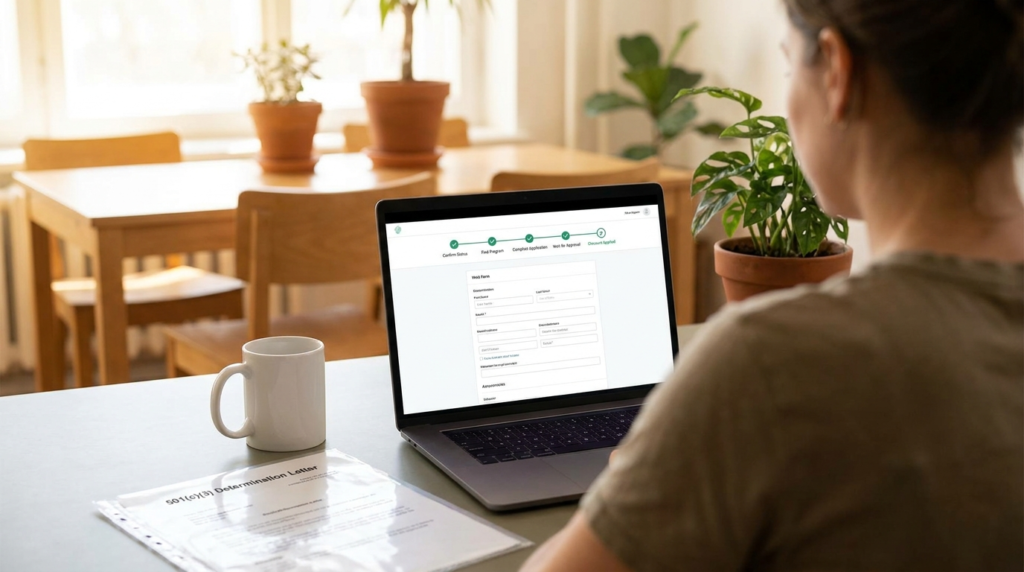
The application process varies slightly by vendor, but the general steps are consistent across most programs:
- Confirm your 501(c)(3) status (US) or equivalent registration in your country. You’ll need your EIN, organization name, and typically a mission statement.
- Locate the vendor’s nonprofit program page — not the commercial pricing page. Links to each vendor’s program page are in the detailed guides linked throughout this article.
- Complete the application — most require EIN, organization name, mission statement, and sometimes proof of registration.
- Wait for approval — typically 1–5 business days. Asana and Notion run verification through Goodstack and TechSoup respectively. Slack handles verification directly.
- Discount applied at checkout or account level on approval — most vendors apply it automatically once eligibility is confirmed.
TechSoup note: Some vendors (Notion, Google Workspace, Salesforce) use TechSoup to verify nonprofit eligibility.
If your organization isn’t TechSoup-verified yet, that process runs separately and includes a one-time administrative fee.
Complete it once and it unlocks verification for multiple vendor programs simultaneously. More at techsoup.org/eligibility.
Start with the tool your team needs most — apply for the nonprofit discount today
Most nonprofit programs approve applications within 1–5 business days. You can apply to multiple programs simultaneously.
- CRM: Apply for HubSpot for Nonprofits
- Project Management: Apply for Asana for Nonprofits
- Communication: Apply for Slack for Nonprofits

How to Choose Nonprofit Software: A 3-Question Framework
Before you start comparing features and pricing, three questions will narrow the field faster than any feature matrix.
1. What problem are you actually solving?
Most nonprofits don’t need more software — they need the right software for the specific bottleneck they’re hitting. If your team is losing track of donor follow-ups, that’s a CRM problem.
If projects are stalling because nobody knows who owns what, that’s a project management problem.
If information is stuck in email threads and people can’t find what they need, that’s a communication and documentation problem. Identify the one thing causing the most friction and start there.
2. How much implementation overhead can your team absorb?
Salesforce NPSP is more powerful than HubSpot for nonprofit-specific operations.
But if you have a two-person admin team and no dedicated IT support, Salesforce will sit half-implemented for months.
A tool your team actually uses consistently beats a more powerful tool that collects dust.
Be honest about your capacity — that should drive the platform choice more than the feature list.
3. Will the discount program still be available when you’re ready to upgrade?
Nonprofit discount programs aren’t guaranteed to continue indefinitely. Discount percentages change, eligibility requirements tighten, and programs occasionally get discontinued.
Verify the current terms directly from the vendor before you build your budget around them.
The tools in this guide have established, long-running programs — but the specific terms I’ve verified here are current as of May 2026 and should be re-verified before applying.
Frequently Asked Questions
What software do most nonprofits use?
The most commonly adopted tools span four categories: CRM and donor management (HubSpot, Salesforce NPSP), project management (Asana, Monday.com), communication (Slack, Google Chat), and productivity and documentation (Google Workspace, Notion).
According to the National Council of Nonprofits, CRM adoption sits at approximately 67% among US nonprofits — making it the most widely used software category in the sector.
Google Workspace is nearly universal as a baseline email and document platform, largely because the free nonprofit tier is available to virtually any registered 501(c)(3).
What is the best free nonprofit software?
Several tools offer free tiers that are genuinely useful: HubSpot Free CRM (unlimited users, unlimited contacts), Asana Personal (up to 10 users), ClickUp Free Forever (unlimited members, unlimited tasks), and Slack Free (90 days of message history).
Google Workspace offers a free nonprofit tier covering email, Drive, Docs, Meet, and Calendar at no cost for eligible organizations.
Here’s the thing though: the free tier is not the same as the nonprofit discount program.
For most tools, the paid plan with a nonprofit discount is what unlocks the features that make the platform actually useful at scale — automation, reporting, admin controls. Start free, but plan to upgrade.
Does nonprofit software have to be different from regular software?
No — but it depends on the use case. Purpose-built nonprofit platforms like Bloomerang and Salesforce NPSP are optimized for donor management, fund accounting, and grant tracking in ways that general SaaS tools aren’t.
If those are your core needs, purpose-built wins.
For operations, communication, and project management, general SaaS tools with nonprofit discount programs — Asana, HubSpot, Slack — are entirely appropriate and often better than nonprofit-specific alternatives that haven’t kept pace with the major platforms’ feature development.
The practical answer: use general SaaS for ops and communication; evaluate purpose-built only for donor management and accounting.
How much does nonprofit software cost?
After applying nonprofit discount programs, a complete five-tool stack for a five-person organization runs approximately $52/month — covering CRM, project management, communication, productivity, and email.
That’s compared to roughly $186/month at full commercial pricing.
The biggest single saving comes from Slack’s free Pro plan for teams under 250 members, followed by Asana’s 50% nonprofit discount.
See the full stack cost breakdown in the table above.
What does nonprofit software do?
Nonprofit software covers five core categories: donor management and CRM (tracking relationships, giving history, and campaigns), project management (planning and executing programs and events), communication (team messaging and collaboration), productivity and documentation (wikis, documents, and knowledge management), and accounting and fundraising (grant tracking, fund accounting, donation processing).
Most small nonprofits don’t need a single platform covering all five — they need the right tool for each category, with integrations between them.
The stack approach covered in this guide is how most well-run small nonprofits actually operate.
Sources

Recent Posts
Monday.com Review 2026: Is It Still the Best Work OS?
I tested Monday.com against ClickUp, Asana, and Wr...
Updated July 27, 2026

AI Writing Software for Blogging in 2026: Best Tools + How to Stay AI-Search Vis...
The best AI writing software for blogging in 2026 ...
Updated July 20, 2026
HubSpot Review 2026: Is It Worth the Cost?
I tested HubSpot’s free CRM, Starter, and Pr...
Updated July 20, 2026
Teamwork.com Review 2026: Is It the Best PM Tool for Client Work?
I tested Teamwork.com for agency and client projec...
Updated May 29, 2026
Wrike Review 2026: Is It Worth the Cost?
I tested Wrike in real enterprise workflows. Here&...
Updated May 29, 2026
Asana Review 2026: Is It Worth It? (Honest, In-Depth Analysis)
I tested Asana across real team workflows. Here...
Updated May 29, 2026
Newsletter
Don't miss a thing!
Sign up to receive daily news