 Tracy Jackson15 yrs in online marketing
Asana Review 2026: Is It Worth It? (Honest, In-Depth Analysis)
Table of Contents
| Asana Review: Quick Verdict Overall rating: 4.4 / 5 Starting price: Free (2 users); paid plans from $10.99/user/mo (annual, 2-seat minimum) Best for: Mid-size and enterprise teams managing complex, multi-step workflows across departments — especially marketing, ops, and IT Skip if: You’re a solo user, a very small team that needs one paid seat, or your workflows are simple enough that Asana’s structure becomes overhead rather than help Free plan: Yes — Personal plan, 2 users, unlimited tasks and projects |
Asana sits near the top of almost every project management shortlist, and it’s earned that position.
But this Asana review isn’t here to rehash the marketing page.
I’ve used it across real team workflows — campaign management, cross-functional launches, ops processes — and the honest picture is more nuanced than most reviews let on.
Asana’s core tension isn’t power vs. complexity the way ClickUp’s is. It’s structure vs. cost.
The tool is polished, reliable, and genuinely well-designed. The friction shows up in the pricing model.
I’ll cover both.
If you want a wider view of how Asana fits alongside other options, I’ve also compared it in my Monday.com review and against the broader project management software landscape.
What Is Asana?
Asana was founded in 2008 by Dustin Moskovitz and Justin Rosenstein — both Facebook co-founders — out of a shared frustration with internal coordination tools.
The original problem they were solving: how do you get a large team to move fast without drowning in meetings and status emails?
That origin still shows in the product.
Amazon, Google, NASA, and Spotify all run on it.
The platform covers task management, project timelines, goals, portfolios, automation, reporting, and integrations — all within a single, consistent interface that’s noticeably easier to navigate than most competitors.
Disclaimer: If you buy something using the links in this article, I may receive a commission at no extra cost to you.
Know that I only promote stuff that I use and trust for the sake of my readers and the reputation of this site.
Who Is Asana Best For?
Asana rewards teams that have real workflow complexity and want structure without configuration hell. Here’s where it genuinely fits:
| Team type | Why Asana fits |
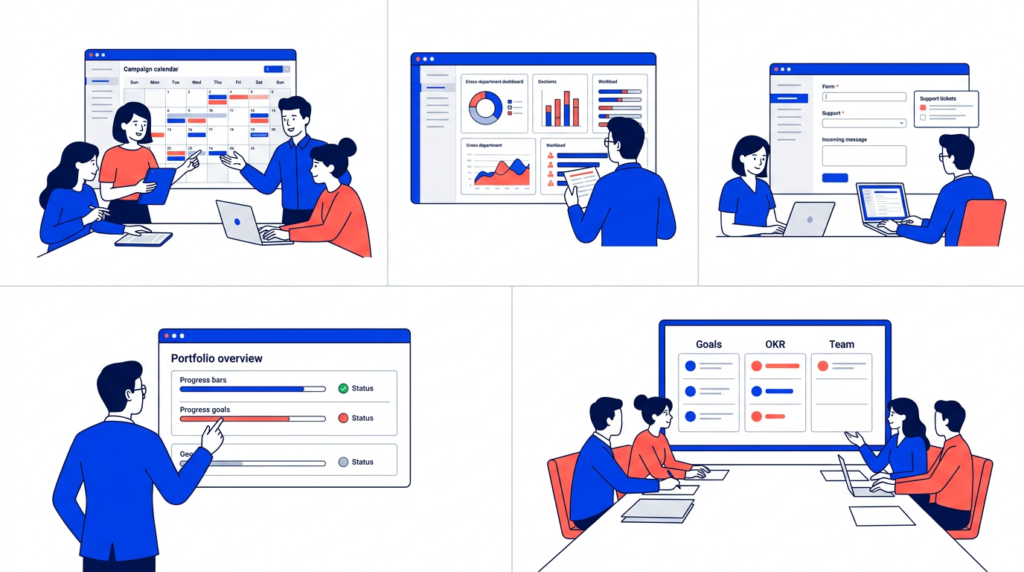
| Marketing teams | Campaign calendars, cross-functional launch plans, and content workflows with real dependency tracking |
| Operations leads | Cross-department reporting, resource management, and process standardisation via Goals and Portfolios |
| IT teams | Ticket intake via Forms, approval workflows, and security-compliant project tracking at Enterprise tier |
| Mid-size companies (50–500 seats) | Robust enough for complex org structures; pricing scales predictably; enterprise security without enterprise setup cost |
| Exec and leadership teams | Goals and Portfolios give real visibility into how team-level work connects to company-level objectives |
Nonprofits get a separate consideration — Asana offers discounts on Starter and Advanced annual plans.
I’ve covered the specifics in my guide to Asana for nonprofits if that’s your context.
Where Asana doesn’t fit: solo users who need one paid seat, very small teams with simple workflows, or anyone who needs a time-tracking-first tool.
More on that in the ‘Who Should NOT Use Asana’ section below.
Asana Features: An In-Depth Look
Task management and views
The task structure in Asana is clean and deliberate.
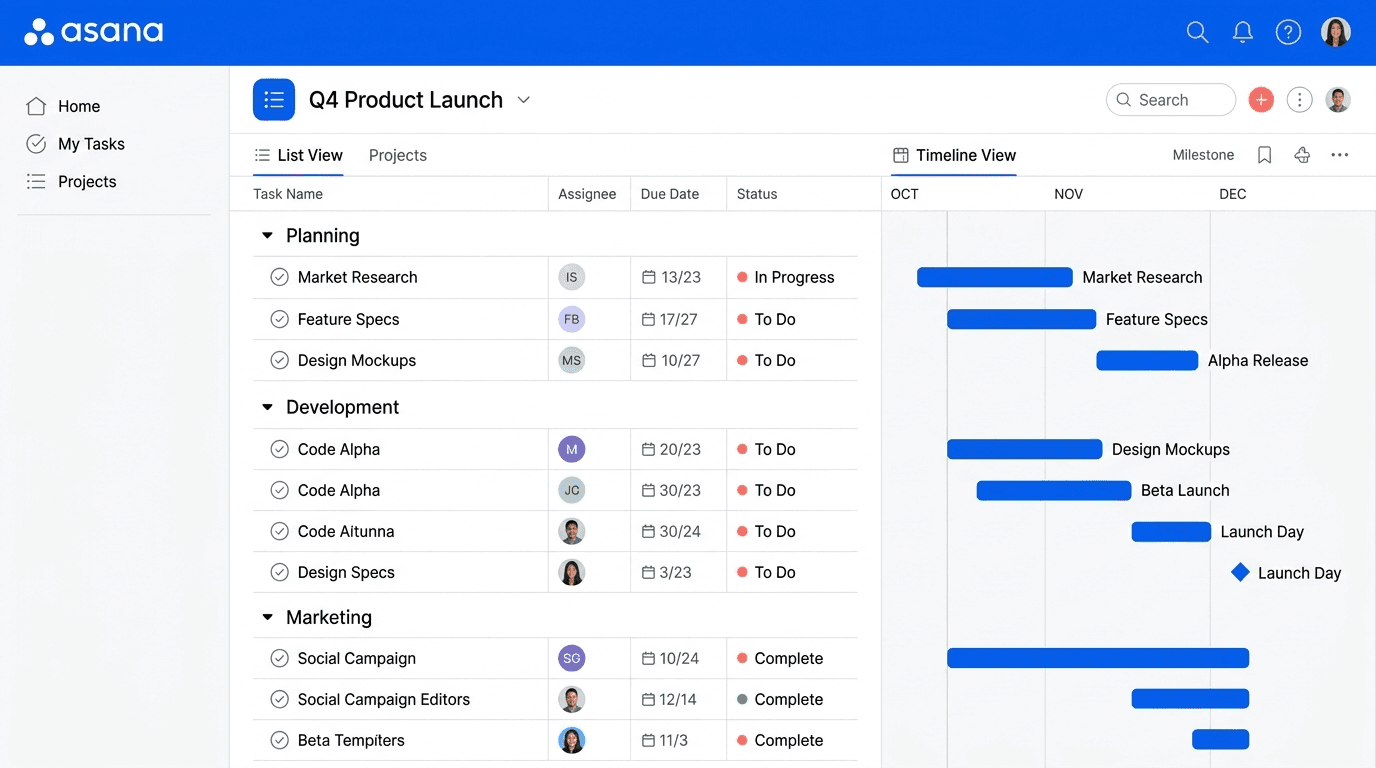
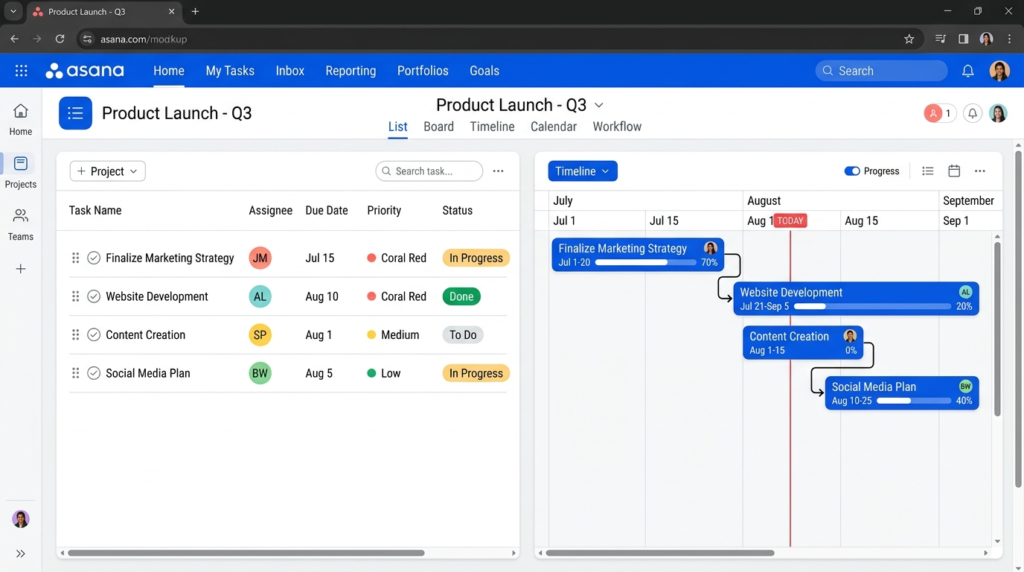
List, Board, Calendar, Timeline, and Gantt views cover the range of how teams want to see their work.
The interface transitions between them without friction — switching from a kanban board to a timeline takes two clicks, and the data follows without any reconfiguration.
The Timeline view deserves specific attention.
It’s one of Asana’s clearest differentiators against simpler tools — a Gantt-style view with dependency tracking that lets you see exactly what’s blocking what, and drag-drop reschedule when a deadline shifts.
For teams managing multi-phase projects with real dependencies — launches, campaigns, product rollouts — this is genuinely useful, not just a visual nicety.
Timeline is on Starter and above; the free Personal plan doesn’t include it.
The overall interface is fast.
Large project boards load quickly, transitions are snappy, and I’ve not hit the performance wall that some tools suffer from as project complexity scales.
For teams that have been burned by slow tools on large boards, this is worth noting explicitly.
Automation (Rules)
Asana’s automation builder uses a trigger-and-action model — when X happens, do Y.
The trigger library is narrower than ClickUp’s but the rules themselves are cleaner and faster to configure.
Where ClickUp’s automation builder can feel like a mini-workflow engine that requires real investment to set up correctly, Asana’s rules are genuinely accessible to non-technical users within minutes.
Common use cases work well: auto-assign tasks when a form is submitted, move a task to a new section when its status changes, notify a team lead when a due date is missed.
Starter includes unlimited automations — there’s no artificial cap on rule count the way some competitors impose at lower tiers.
The honest nuance: if you need complex multi-step automation chains or want to trigger actions based on custom field changes across projects, ClickUp’s automation layer goes further.
Asana’s rules are excellent for the 80% of use cases teams actually hit; they run out of headroom on the edge cases.
Know which camp your workflows fall into before making a decision based on automation alone.
Goals and Portfolios
This is where Asana earns its keep for leadership teams.
Goals connects company, team, and individual-level objectives to specific projects — so when a campaign project moves forward, the connected marketing goal updates automatically.
Portfolios give executives a cross-project dashboard that shows status, progress, and workload across everything running in parallel.
For organisations managing multiple departments or running OKR-style goal frameworks, this is legitimately valuable.
I’ve seen this replace entire spreadsheet-based goal tracking systems at mid-size companies.
The caveat: both Goals and Portfolios are locked to the Advanced plan.
If your team is on Starter, you won’t see them.
And for individual contributors or small teams without strategic reporting needs, they’re genuine overhead — features you’ll pay for and never use.
Reporting and dashboards
Asana’s universal reporting dashboard pulls data across multiple projects into a single view — task completion rates, overdue work, workload distribution by team member.
For project managers or ops leads who need a live read on overall team health, it’s one of the better implementations in this category.
The dashboard builder is chart-based: you pick the metric, pick the visualisation, and the data populates in real time.
It’s not Power BI, but it doesn’t need to be — it covers the reporting needs most teams actually have without requiring a data analyst to configure it.
Starter gets project-level dashboards; Advanced adds portfolio-level reporting and deeper workload views.
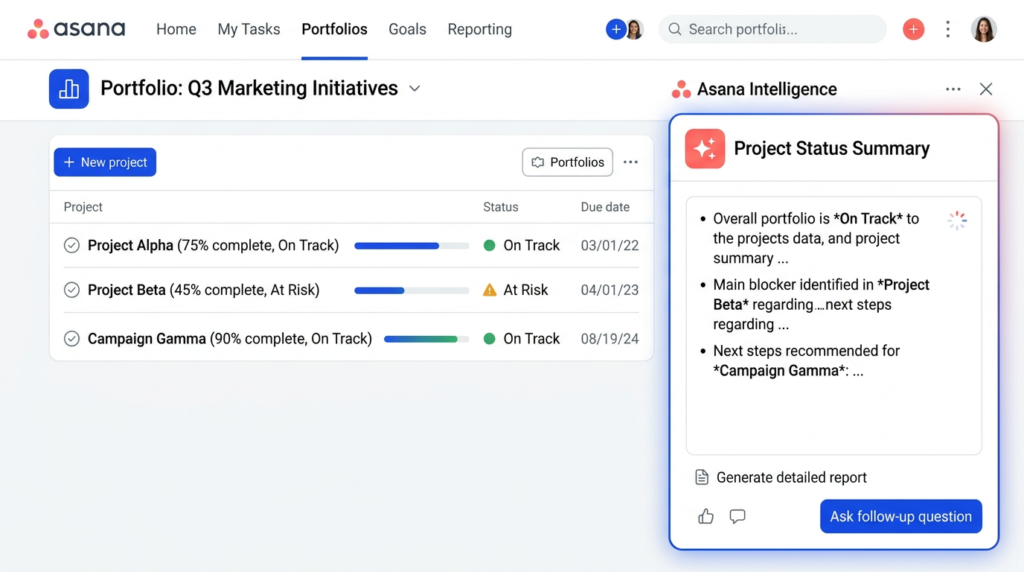
Asana AI (Asana Intelligence)
AI Studio Basic is included on all paid plans — Starter, Advanced, Enterprise, and Enterprise+.
It covers smart task summaries, AI-generated sub-tasks, automated status updates, and a smart chat interface that lets you ask questions about your work in natural language.
The honest assessment: the AI features are most impactful at scale.
Smart status updates on portfolios and goals — where Asana AI drafts a progress summary by analysing project data — is a real time-saver for execs and project managers tracking a lot of work simultaneously.
For a 5-person team on Starter managing one or two projects, the AI layer adds marginal value.
It’s there, it works, but it won’t change how your team operates day-to-day at that scale.
Integrations
200+ native integrations is one of Asana’s strongest cards.
The list includes Slack, Google Drive, Microsoft Teams, Zoom, Salesforce, GitHub, Jira, Tableau, and Power BI — not just the obvious consumer tools but the enterprise stack that mid-size and larger companies actually run on.
The Salesforce and BI tool integrations on Advanced and above are a genuine differentiator for ops and sales teams who need project data to flow into their reporting layer.
The native integrations are also deeper than the Zapier-dependent connections you see in some competitors.
The Slack integration, for example, creates and updates Asana tasks directly from Slack messages — not just a notification pipe.
For teams already running on the enterprise app stack, Asana slots in without the custom plumbing that lighter tools require.
Mobile apps
iOS and Android apps cover the core task management workflow — viewing, creating, and updating tasks, leaving comments, and checking project status.
Offline functionality improved in 2026: tasks and comments are now available without a connection and sync automatically when you reconnect.
For teams that work in the field or from unreliable connections, that’s a real usability improvement.
The mobile experience is notably snappier than some competitors.
Switching between projects on mobile doesn’t produce the lag that ClickUp’s mobile app can generate on large workspaces.
It’s not a full desktop replacement — complex dashboard views and goal management work better on desktop — but for on-the-go task management, it holds up well.
Security
Asana’s security posture is enterprise-grade: SOC 2 Type II, 256-bit encryption in transit and at rest, multi-factor authentication, and cross-regional backups on all plans.
SAML SSO and SCIM provisioning are Enterprise and above.
One real weakness to flag: 24/7 support and the 99.9% uptime SLA are Enterprise-only.
Starter and Advanced customers get standard support hours.
If you have a critical incident on a Saturday night and you’re on the Advanced plan, you’re waiting until Monday.
Some competitors include higher-tier support at lower price points.
This is a genuine gap for teams with reliability requirements who aren’t ready to move to Enterprise pricing.
Customer support
Support quality is one of the more consistent complaints in real Asana user reviews, and it’s not unfair.
The Help Center is well-documented and Asana Academy is genuinely useful for onboarding.
Direct support — available to all paid plans — is functional for routine issues.
The friction shows up when you have a complex implementation problem or a time-sensitive incident.
Customer success is a paid add-on, not a bundled service. 24/7 support is Enterprise-only.
If you’re on Starter or Advanced and hit something genuinely tricky, the support tier doesn’t match the tool’s complexity.
That’s worth knowing before you sign an annual contract.
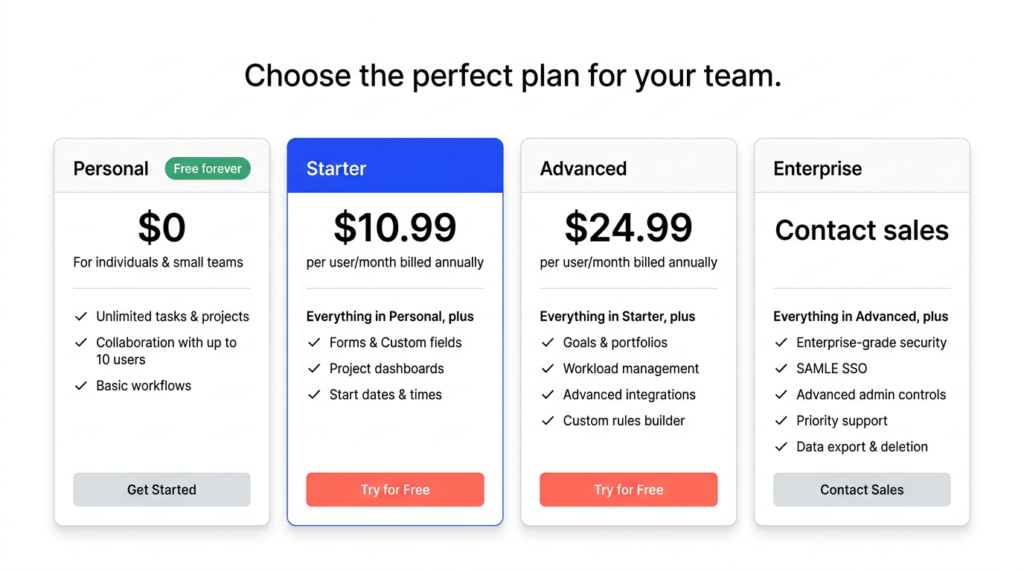
Asana Pricing
Here’s how the plans break down, verified against the live pricing page (May 24, 2026):
| Plan | Annual | Monthly | Key Details |
| Personal | $0 | $0 | 2 users max; unlimited tasks/projects; list, board, calendar views |
| Starter | $10.99/user/mo | $13.49/user/mo | 2-seat minimum; unlimited seats; Timeline + Gantt; unlimited automations; AI Studio Basic |
| Advanced | $24.99/user/mo | $30.49/user/mo | Goals; unlimited portfolios; native time tracking; workload management; AI Studio Basic |
| Enterprise | Custom | Custom | SAML SSO, SCIM, 24/7 support, 99.9% uptime SLA, capacity planning |
| Enterprise+ | Custom | Custom | Advanced compliance, data residency, SIEM integration, audit logs |
| ⚠️ No single-user paid plan — minimum 2 seats Asana doesn’t sell a one-seat paid subscription. The minimum on any paid plan is 2 seats. If you’re a solo user who needs Timeline, automation, or any other paid feature, you’re paying for 2 seats whether you use them or not. At Starter, that’s $21.98/month annual minimum. It’s not hidden exactly — but it’s not prominently displayed either, and it catches people out. |
| ⚠️ 24/7 support is Enterprise-only Starter and Advanced customers get standard support hours. Customer success is a paid add-on at all tiers. If support responsiveness matters to your team — especially for weekend incidents or complex implementation questions — factor this into your plan decision. Moving to Enterprise for support access alone is a significant price jump. |
The Personal plan is free and permanent — not a time-limited trial. It’s enough to evaluate Asana’s interface and core task management before committing.
Timeline, automations, and advanced reporting all require a paid plan.
Asana Pros and Cons
| ✅ Pros | ❌ Cons |
| Clean, intuitive interface — one of the fastest onboarding experiences in the category | No single-user paid plan — minimum 2 seats on Starter, even for solo users who need paid features |
| Timeline and Gantt views are genuinely excellent for dependency tracking and project scheduling | No native time tracking timer on free or Starter; basic estimate vs. actual tracking requires Advanced |
| Goals and Portfolios connect team execution to company objectives — real value at org scale | 24/7 customer support is Enterprise-only — Starter and Advanced customers get standard hours only |
| 200+ native integrations — one of the broadest integration libraries in the space | Customer success is a paid add-on — not bundled into lower tiers |
| Performance is consistently fast and reliable; large boards load without the lag you see in some competitors | Expensive relative to ClickUp for feature-equivalent setups, especially for smaller teams |
| Trusted by Amazon, Google, NASA, and Spotify — enterprise-grade security and uptime | Goals and Portfolios locked to Advanced — key differentiators are behind the higher paywall |
| AI Studio Basic included on all paid plans — no separate AI add-on fee | Automation on Starter is unlimited in rule count but can feel limited in trigger variety vs. ClickUp |
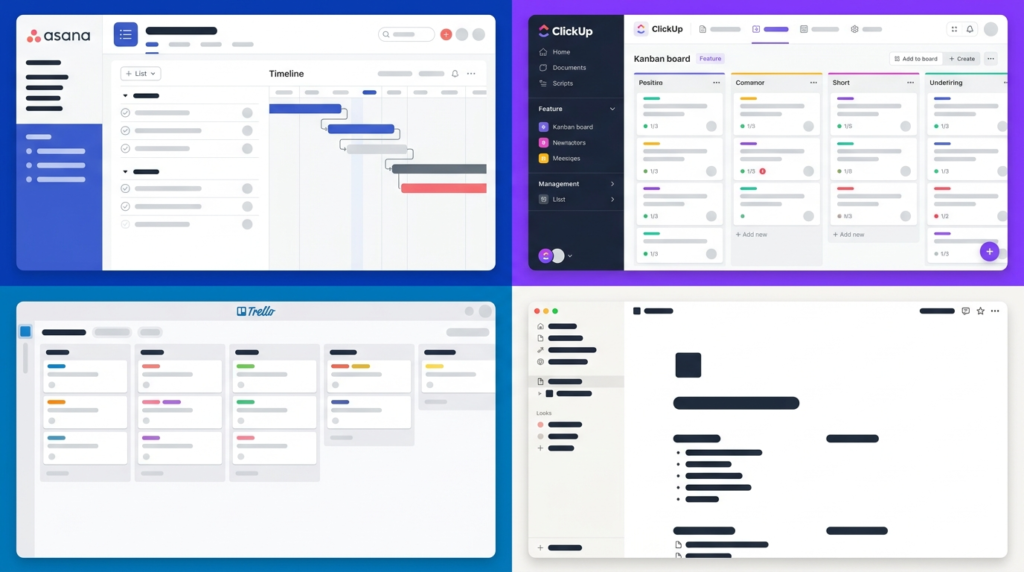
How Does Asana Compare to Alternatives?
The four tools that come up most often in the same conversation:
| Asana | ClickUp | Trello | Notion | |
| Free plan | Yes — 2 users | Yes — unlimited members | Yes — unlimited cards | Yes — limited blocks |
| Starting price (annual) | $10.99/user/mo | $7/user/mo | $5/user/mo | $10/seat/mo |
| Best for | Structured team workflows | Feature-rich all-in-one | Simple kanban boards | Docs + flexible wikis |
| Timeline / Gantt | Yes (Starter+) | Yes (all plans) | No (Power-Up only) | No |
| Native time tracking | Advanced+ only | Unlimited+ (basic) | No | No |
| Goals / OKRs | Advanced+ | All paid plans | No | Limited |
| AI features | AI Studio Basic (paid plans) | Brain AI ($9/user add-on) | No | AI block (paid) |
| Learning curve | Low–medium | High | Very low | Medium |
The short version: Asana beats ClickUp on ease of onboarding, UI polish, and integration depth.
ClickUp beats Asana on price-per-feature and flexibility for power users. Trello is simpler and cheaper but lacks the reporting and goal-tracking layer entirely.
Notion is better for documentation-heavy teams but isn’t a project management tool in the same sense.
I’ve gone deeper on the ClickUp comparison in my ClickUp review — worth reading if ClickUp is still on your shortlist.
Who Should NOT Use Asana?
The Reddit thread titled ‘WHY YOU SHOULD AVOID ASANA AT ALL COSTS’ ranks on the first page of results for ‘asana review.’ I’m not going to dismiss it.
The complaints in that thread — and in real user reviews — point to real product limitations. Here’s who should look elsewhere:
- Solo users who need paid features — The 2-seat minimum means you’re paying for a seat you don’t use. ClickUp gives you more at lower absolute cost for single-user setups.
- Teams with tight budgets on small headcounts — Asana’s per-seat pricing adds up fast. A 5-person team on Advanced pays $124.95/month annual. That’s real money for a small business. ClickUp or Trello deliver more per dollar at that scale.
- Teams that need a native time-tracking timer — Asana has no built-in timer on free or Starter. Advanced has estimate vs. actual time tracking but still no one-click global timer. If your team bills by the hour or needs payroll-connected time tracking, add a dedicated tool (Toggl, Harvest, Clockify) regardless of which PM platform you choose.
- Teams that expect high-quality support below Enterprise tier — If a weekend incident with no 24/7 cover is a business risk, either budget for Enterprise or choose a tool that includes better support at lower tiers. SmartSuite is one option that includes higher-tier support at lower price points.
- Teams with very simple workflows — If you’re managing a handful of tasks with no dependencies, no cross-team reporting needs, and no goal tracking, Asana’s structure becomes overhead. Trello or a simple to-do tool will serve you better and cost less.

Final Verdict: Is Asana Worth It?
Asana is worth it for structured teams managing complex, multi-step workflows — especially in marketing, operations, and IT.
The interface is the best in the category for non-technical users, the integration library is genuinely deep, and Goals and Portfolios deliver real value for organisations that need execution tied to strategy.
The pricing is higher than ClickUp for equivalent features, and the minimum-seat constraint and Enterprise-only support are real friction points that other reviews tend to gloss over.
My verdict by team type:
- Marketing and ops teams at 10+ seats: Strong yes. The Timeline, reporting, and integration depth justify the cost at this scale.
- IT teams needing enterprise-grade security: Yes — especially at Enterprise tier where the full security and support stack unlocks.
- Small teams under 5 people: Hesitation warranted. Run the math on minimum seats vs. ClickUp at the same feature level before committing.
- Solo users or anyone needing a native timer: Look elsewhere. The per-seat floor and missing timer are genuine blockers.
The Personal plan is the right starting point — free, permanent, and enough to evaluate whether Asana’s structure works for your team. Try Asana free.
Frequently Asked Questions
Is Asana worth it?
Asana is worth it for structured teams managing complex, multi-step workflows across departments.
The interface is the cleanest in the category, the integration library is deep, and Goals and Portfolios add real strategic value at org scale.
For small teams, solo users, or simple workflows, the per-seat pricing model and 2-seat minimum make cheaper alternatives the better call.
What are the biggest downsides of Asana?
Four genuine weaknesses: the pricing is on the expensive side relative to ClickUp for equivalent features; there’s no single-user paid plan (2-seat minimum); there’s no native time tracking timer on free or Starter plans; and 24/7 customer support is Enterprise-only.
Starter and Advanced customers get standard support hours and no bundled customer success.
Does Asana have a free plan?
Yes — the Personal plan is free and permanent for up to 2 users.
It includes unlimited tasks, unlimited projects, and list, board, and calendar views.
Timeline, Gantt, automation, Goals, Portfolios, and advanced reporting all require a paid plan.
Best suited for evaluation or solo use — the 2-user cap limits it for team collaboration.
How does Asana compare to ClickUp?
Asana wins on interface polish, ease of onboarding, and integration depth — it’s the better choice for non-technical teams and organisations that want structure without configuration overhead.
ClickUp wins on price-per-feature (Unlimited starts at $7/user/mo vs. Asana Starter at $10.99), automation flexibility, and a more generous free plan.
I’ve covered this in detail in my full ClickUp review.
Does Asana have time tracking?
Not as a native timer.
The Personal and Starter plans have no built-in time tracking beyond integration-based tracking via third-party tools like Toggl, Harvest, or Everhour.
The Advanced plan adds estimate vs. actual time tracking — you can log expected and actual hours on tasks — but there’s still no one-click global timer.
If time tracking for billing or payroll is a core requirement, plan for a dedicated integration regardless of which Asana tier you’re on.
Sources

Recent Posts
Monday.com Review 2026: Is It Still the Best Work OS?
I tested Monday.com against ClickUp, Asana, and Wr...
Updated July 27, 2026

AI Writing Software for Blogging in 2026: Best Tools + How to Stay AI-Search Vis...
The best AI writing software for blogging in 2026 ...
Updated July 20, 2026
HubSpot Review 2026: Is It Worth the Cost?
I tested HubSpot’s free CRM, Starter, and Pr...
Updated July 20, 2026
Teamwork.com Review 2026: Is It the Best PM Tool for Client Work?
I tested Teamwork.com for agency and client projec...
Updated May 29, 2026
Wrike Review 2026: Is It Worth the Cost?
I tested Wrike in real enterprise workflows. Here&...
Updated May 29, 2026
Asana Review 2026: Is It Worth It? (Honest, In-Depth Analysis)
I tested Asana across real team workflows. Here...
Updated May 29, 2026
Newsletter
Don't miss a thing!
Sign up to receive daily news