 Tracy Jackson15 yrs in online marketing
Wrike Review 2026: Is It Worth the Cost?
Table of Contents
Wrike Review: Quick Verdict
| Wrike Review: Quick Verdict Overall rating: 4.3 / 5 Starting price: Free (up to 5 users); paid plans from $10/user/mo (Team, annual billing, 2–15 users) Best for: Mid-market and enterprise teams managing complex, multi-step workflows — especially marketing agencies, creative teams, and IT or ops departments with formal approval chains Skip if: You’re a small team with simple task management needs, or your budget caps out below the Business plan — most of Wrike’s useful features don’t unlock until $25/user/mo Free plan: Yes — up to 5 users. All paid plans include a 14-day free trial, no credit card required. |
Three Reddit threads rank on the first page of results for ‘wrike review’ — all scepticism-framed. ‘Convince me Wrike is good.’ ‘Is it worth it?’ ‘Does anyone actually use it?’
That’s not a coincidence.
This Wrike review is written for the person in that exact position: you’ve seen Wrike on a shortlist, you’ve heard mixed things, and you want a straight answer.
I’ve used Wrike on real enterprise workflows — campaign management, IT ticket intake, cross-department project tracking.
Most negative reviews come from small teams or simple-use-case buyers who were sold an enterprise product they didn’t need.
Whether it’s right for you depends on team size, workflow complexity, and willingness to invest in setup.
For a broader view of where Wrike sits in the market, I’ve covered that in my Monday.com review and the full project management software landscape.
What Is Wrike?
Wrike launched in 2006, built around the idea that enterprise project management didn’t have to mean expensive, complex legacy software.
It was acquired by Citrix in 2018 and then by Vista Equity Partners in 2021 — the Vista acquisition is worth noting for enterprise buyers assessing ownership continuity.
Vista is a major private equity firm with a strong track record in enterprise software, and the acquisition brought additional investment in Wrike’s enterprise and AI feature roadmap.
Today Wrike serves 30,000+ organisations, positioned squarely at mid-market and enterprise.
It’s more structured than ClickUp, more feature-rich than Asana at comparable price points, and built for teams with formal approval chains, complex dependencies, and multi-department workflows.
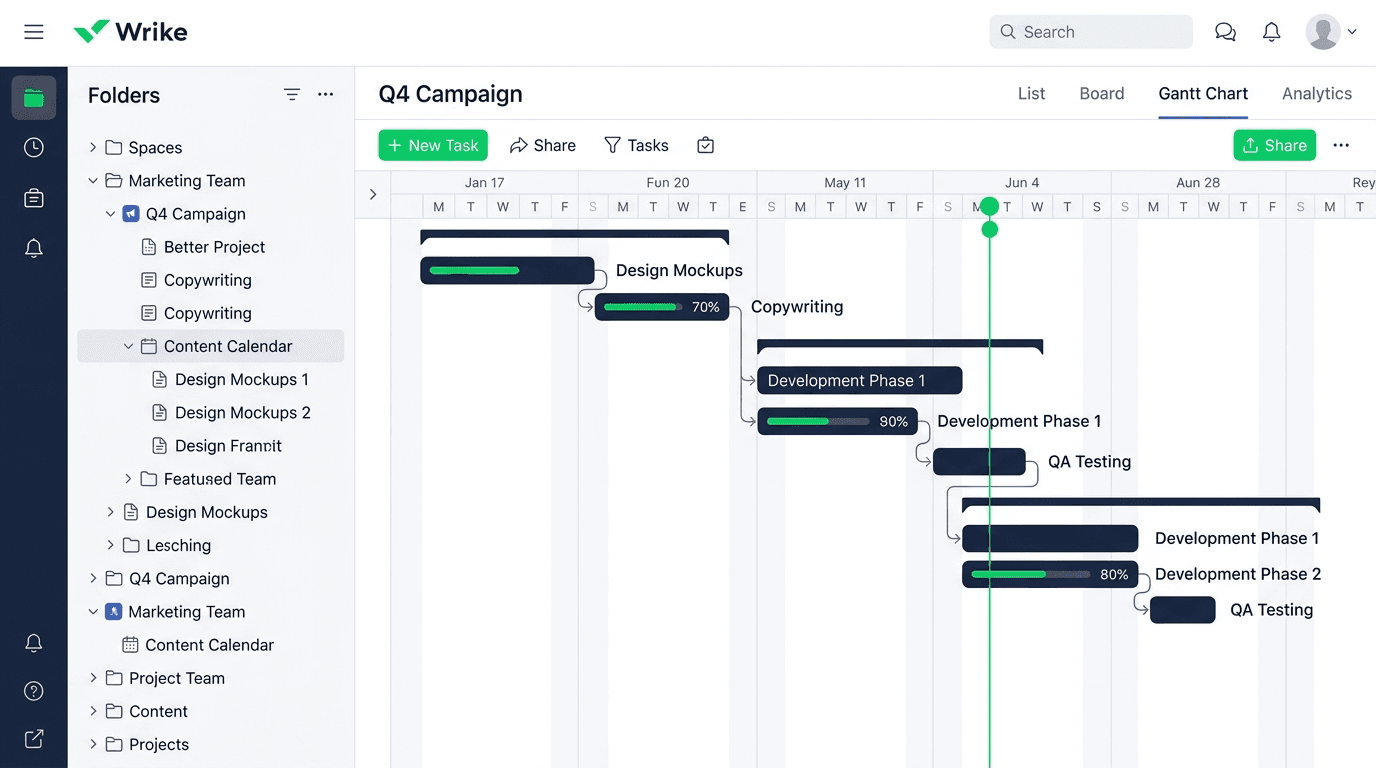
The platform covers task management, interactive Gantt charts, custom workflows, request forms, built-in proofing, time tracking, reporting, and a growing AI layer.
Disclaimer: If you buy something using the links in this article, I may receive a commission at no extra cost to you.
Know that I only promote stuff that I use and trust for the sake of my readers and the reputation of this site.
Who Is Wrike Best For?
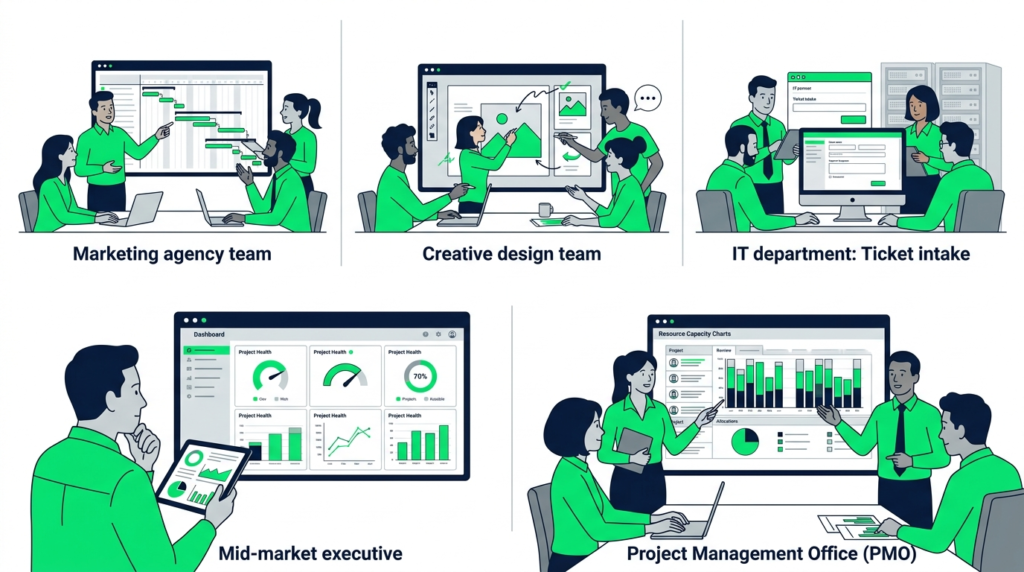
Wrike earns its price tag for teams with workflow complexity that simpler tools can’t handle. Here’s where it genuinely fits:
| Team type | Why Wrike fits |
| Marketing agencies | Request forms handle client brief intake; proofing and approval workflows replace email-based review cycles; campaign timelines map directly to Gantt dependencies |
| Creative and design teams | Adobe Creative Cloud integration keeps assets in context; built-in proofing with markup tools eliminates the separate review tool; approval chains are native, not bolted on |
| IT and operations departments | Custom ticket intake via request forms, HIPAA-ready security for regulated industries, role-based permissions, and audit logs meet enterprise compliance requirements |
| Mid-market companies (50–500 seats) | Feature depth handles complex org structures; pricing scales in predictable groups; enterprise security without custom enterprise pricing until Pinnacle tier |
| PMO and project portfolio teams | Cross-project dashboards, resource capacity planning, and budgeting at Pinnacle make Wrike one of the stronger options for formal portfolio management |
Where Wrike doesn’t fit: solo users, small teams whose needs the Team plan covers, anyone who needs a tool running within a week, and teams that want a visually clean interface without configuration overhead.
Wrike Features: An In-Depth Look
Task management and views
Wrike covers the standard view range: List, Board, Table, Calendar, and Gantt.
The interface is information-dense — more so than Asana or Monday.com — which is either a strength or a friction point depending on your team’s sophistication.
For complex projects with lots of moving parts, having that data visible saves constant tab-switching.
For teams new to structured project management, the density is overwhelming.
Custom statuses, nested subtasks, task dependencies, multiple assignees, and custom fields all work reliably.
The Spaces → Folders → Projects → Tasks hierarchy gives enterprise teams real organisational structure.
The Table view is a clean spreadsheet-style alternative that works better here than in most competitors.
Interactive Gantt charts
This is Wrike’s clearest differentiator against Asana.
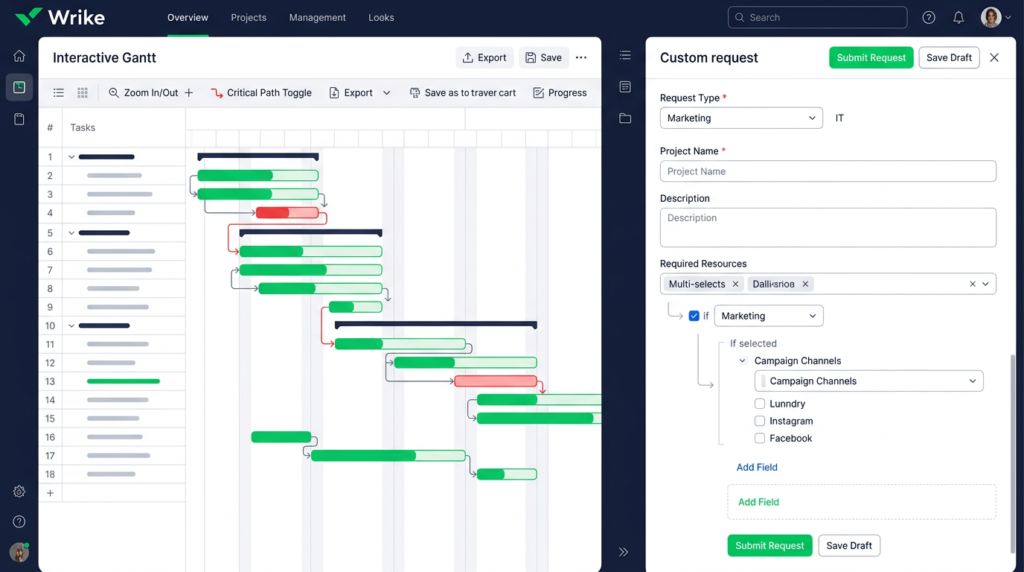
Where Asana’s Timeline shows dependencies and lets you reschedule, Wrike’s Gantt charts are interactive in a deeper way — you can drag dependencies, see critical path highlighting in real time, and adjust linked tasks automatically when a predecessor shifts.
For project managers running multi-phase campaigns or product launches with real dependency chains, this is a material difference, not a visual one.
Gantt charts are on Team and above — the free plan doesn’t include them.
If interactive Gantt is a primary requirement, Team at $10/user/mo is genuinely competitive against Asana Starter at $10.99 despite similar pricing, because Wrike’s Gantt goes further.
Custom workflows and request forms
Wrike’s custom request forms are one of the features that separate it most clearly from ClickUp and Asana.
The form builder supports conditional logic — fields appear or hide based on previous answers — which means you can build a single marketing brief intake form that routes differently depending on whether the request is a social asset, a landing page, or a video production.
The submitted form auto-creates a task with all the brief details populated.
Asana has request forms on Starter, but without the conditional logic depth. ClickUp’s form builder is more limited.
For agencies managing multiple client types or IT teams handling diverse ticket categories, Wrike’s intake forms eliminate manual routing and re-entry in a way no other tool in this cluster matches.
Automation
Wrike’s automation builder uses the standard trigger-and-action model.
The trigger library is narrower than ClickUp’s in total count, but the triggers themselves are better suited to enterprise handoff processes — approval chain completions, status changes that trigger cross-project notifications, and deadline-based escalations are all handled cleanly.
The honest comparison: ClickUp has more total trigger types.
Wrike’s automation fits better inside formal project governance — it runs out of headroom on edge cases like complex multi-step chains or custom field triggers across projects.
Know your actual use case before treating trigger count as the deciding factor.
Proofing and approvals
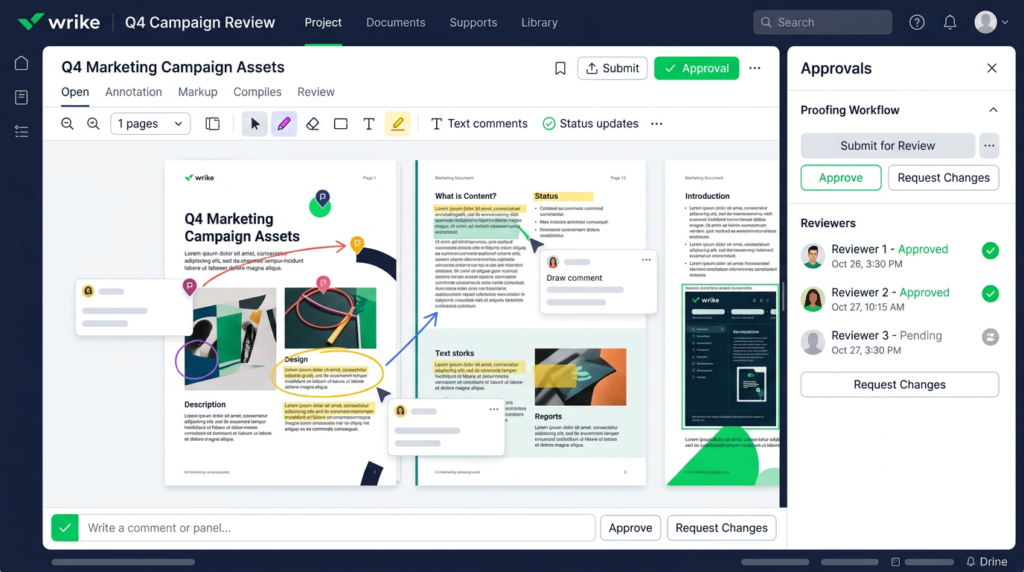
This is Wrike’s most distinctive feature in this category, and the one most reviews undersell.
Built-in proofing lets team members annotate directly on images, PDFs, and video assets inside Wrike — drawing markup tools, comment pins, and version tracking — without leaving the platform or opening a separate review tool.
Approval workflows attach to proofing tasks so that sign-off is tracked, timestamped, and tied to the project record.
For context: ClickUp, Asana, and Monday.com don’t have native proofing at this level.
The closest equivalent requires a third-party tool — Frame.io, Filestage, or similar.
Wrike builds it in on Business and above.
For creative agencies running multiple client review cycles per week, this alone can justify the price difference over a cheaper tool plus a separate proofing subscription.
Reporting and analytics
Wrike’s reporting dashboard is cross-project by design — task completion rates, workload distribution, time tracking summaries, and project health across multiple projects in a single view.
On Business you get solid customisable dashboards and team member performance reports.
Advanced BI integration, third-party data sources, and forecasting are Pinnacle-tier — for organisations that need executive-level portfolio analytics, not day-to-day project management.
Wrike AI (Work Intelligence)
Wrike’s AI layer is called Work Intelligence, and it’s more mature than most competitors’ AI features for enterprise workflows.
AI Essentials on the Team plan covers the basics: content editing, comment summaries, inbox prioritisation, and natural language automation rule generation (you describe what you want to automate in plain English and Wrike builds the rule).
AI Elite on Business and above adds AI agents for targeted workflow automation.
The risk prediction feature — which flags tasks at risk of missing deadlines based on project pattern analysis — is one of the more practically useful AI features in this category.
For PMs managing 10+ concurrent projects it surfaces real early warnings rather than just summarising what’s already visible.
Integrations
400+ integrations is one of the broader libraries in the category.
The expected tools are covered — Slack, Microsoft Teams, Google Drive, GitHub, Salesforce, Jira.
The one worth naming explicitly: Adobe Creative Cloud.
For creative agencies, linking Photoshop, Illustrator, and Premiere Pro assets directly to Wrike tasks — and triggering review workflows from within Adobe apps — removes a significant layer of file handoff friction.
No other tool in this cluster offers that natively.
Security
SOC 2 Type II, ISO 27001, GDPR compliance, and HIPAA-readiness cover the security requirements of most regulated industries.
Role-based permissions, audit logs, and admin controls are on Business and above; SAML SSO and SCIM on request at enterprise tier.
The HIPAA capability is worth flagging for healthcare-adjacent buyers — it’s not common in this category at non-custom pricing, and Wrike is one of the few options that doesn’t require a fully custom contract to get there.
Mobile app
iOS and Android cover task management, approvals, and status updates well enough for on-the-go use.
Wrike is fundamentally a desktop-first tool — the information density that makes the desktop experience powerful works against the mobile experience. Request form submissions and approval sign-offs work cleanly on mobile.
Building dashboards, configuring workflows, or managing Gantt dependencies does not.
If mobile is a primary work mode for your team, test the app on your actual devices before committing.
Wrike Pricing
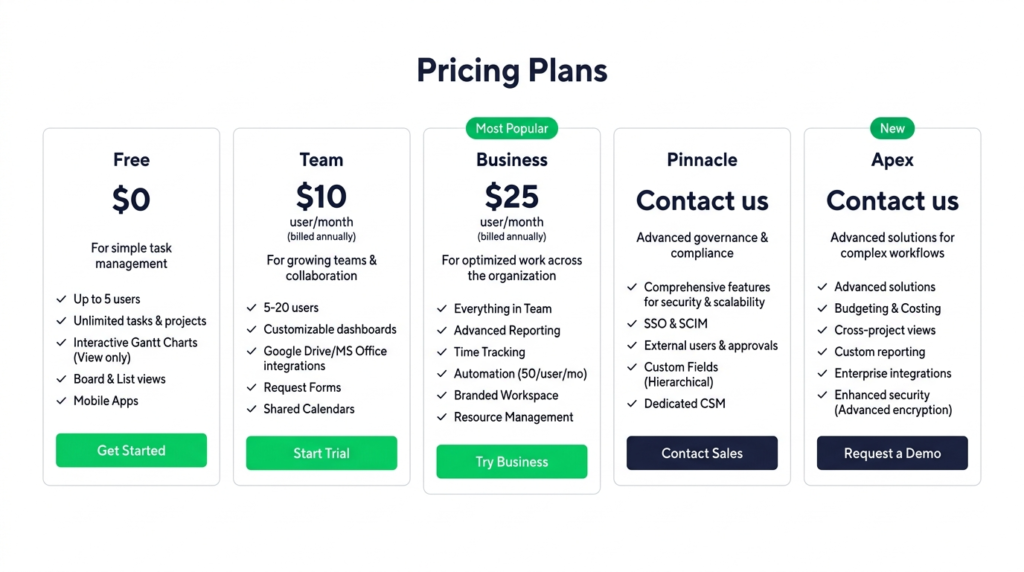
| Plan | Annual | Monthly | Key Details |
| Free | $0 | $0 | Up to 5 users; basic tasks, board view, table view; no Gantt, no automation |
| Team | $10/user/mo | Annual only | 2–15 users; interactive Gantt charts; shareable dashboards; AI Essentials |
| Business | $25/user/mo | Annual only | 5–200 users; custom workflows; request forms; time tracking; proofing; AI Elite (starter) |
| Pinnacle | Custom | Custom | Unlimited users; advanced resource/capacity planning; budgeting; advanced BI; AI Elite (3x) |
| Apex | Custom | Custom | Unlimited users; AI Elite (10x); unlimited whiteboards; Wrike Integrate + Sync; all add-ons included |
| ⚠️ The Team-to-Business pricing jump is the most common Wrike complaint — and it’s legitimateThe jump from Team ($10/user/mo) to Business ($25/user/mo) is 2.5x. And here’s the problem: the features most professional teams actually need — custom request forms, built-in proofing, time tracking, and full automation — are all locked to Business. Team is a functional plan for small teams that genuinely only need Gantt charts and basic collaboration. But if you’re evaluating Wrike because you want workflow automation, intake forms, or proofing, you’re evaluating the Business plan. Budget accordingly from day one. |
| ✅ 14-day free trial — more generous than Asana and ClickUpAll Wrike paid plans include a 14-day free trial, no credit card required. Asana and ClickUp both rely on free plans for evaluation — which means you’re evaluating a limited feature set. Wrike’s trial gives you access to the full paid plan you’re testing. For enterprise buyers doing due diligence on Business or Pinnacle, this is a real advantage: you can test proofing, request forms, and time tracking before committing. |
One structural note: Wrike sells seats in groups — groups of 5 for accounts up to 30 seats, groups of 10 for 30–100 seats, groups of 25 above 100 seats.
A 17-person team buys 20 seats. Factor this into your cost calculation at Business pricing. More detail on plan structure in my detailed Wrike pricing breakdown.
Wrike Pros and Cons
| ✅ Pros | ❌ Cons |
| Interactive Gantt charts with real-time dependency tracking — more powerful than Asana’s Timeline for complex projects | Steep pricing jump from Team ($10/user/mo) to Business ($25/user/mo) — 2.5x increase to access most professional features |
| Built-in proofing and markup tools — unique in this category; no comparable native feature in ClickUp, Asana, or Monday.com | Significant learning curve — interface is dense and requires real setup investment before teams operate smoothly |
| Custom request forms with conditional logic — purpose-built for agency intake and enterprise ticket management | Group-based seat purchasing adds cost friction — seats sold in groups of 5, 10, or 25 depending on account size |
| Native time tracking on Business and above — unlike Asana, no third-party integration required | Mobile app is functional for task updates but not suitable for complex workflow or dashboard management |
| 400+ integrations including Adobe Creative Cloud — a genuine differentiator for creative and marketing teams | Business plan is the minimum tier for request forms, proofing, and time tracking — features teams often assume are standard |
| 14-day free trial on all paid plans — more evaluative runway than Asana or ClickUp’s free-plan-only model | Interface can feel cluttered compared to Asana and Monday.com — information density is high by design but overwhelming at onboarding |
| Enterprise-grade security: SOC 2 Type II, GDPR, HIPAA-ready — strong for regulated industries | No monthly billing option published — annual commitment required at Business and above |
How Does Wrike Compare to Alternatives?
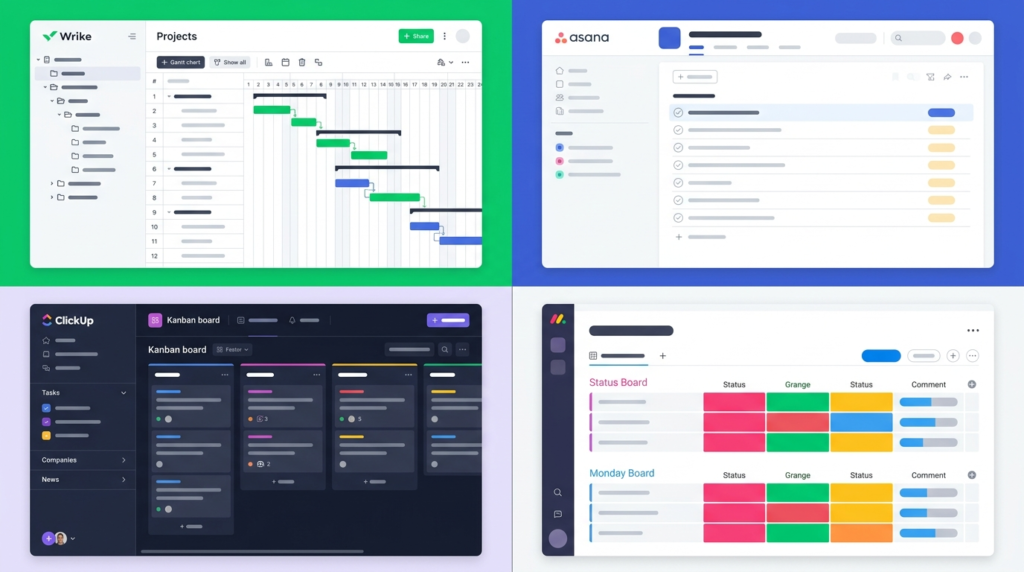
| Wrike | Asana | ClickUp | Monday.com | |
| Free plan | Yes — 5 users | Yes — 2 users | Yes — unlimited members | No team free plan |
| Starting price (annual) | $10/user/mo | $10.99/user/mo | $7/user/mo | $9/seat/mo |
| Best for | Enterprise / creative agencies | Structured team workflows | Feature-rich all-in-one | Visual workflows |
| Interactive Gantt | Yes — all paid plans | Yes (Starter+) | Yes (all plans) | Yes (Pro+) |
| Built-in proofing | Yes (Business+) | No | No | No |
| Native time tracking | Yes (Business+) | Advanced+ only | Unlimited+ (basic) | Yes (Pro+) |
| Custom request forms | Yes (Business+) | Yes (Starter+) | Limited | Limited |
| AI features | AI Essentials (Team); AI Elite (Business+) | AI Studio Basic (paid plans) | Brain AI ($9/user add-on) | AI credits bundled |
| Learning curve | High | Low–medium | High | Low–medium |
The summary: Wrike is the strongest option here for creative agencies and enterprise teams with formal approval chains.
The built-in proofing and interactive Gantt are genuine differentiators. ClickUp offers more features per dollar for generalist teams.
Asana is faster to onboard for non-technical teams. Monday.com wins on visual simplicity.
I’ve gone deeper on the individual comparisons in my ClickUp review and Asana review — worth reading if either tool is still on your shortlist.
Who Should NOT Use Wrike?
The Reddit scepticism about Wrike is real, and most of it comes from a specific mismatch: teams that needed a simple $10/user tool were sold a $25/user enterprise platform.
Here’s who should look elsewhere:
- Small teams with simple workflows — If you’re managing straightforward tasks without dependencies, approval chains, or intake forms, Wrike’s complexity is overhead you’re paying for and not using. ClickUp’s free plan or Asana Personal will serve you better.
- Budget-constrained teams under 10 people — The Team plan is capped at 15 users and its useful features are limited. The Business plan at $25/user/mo for a 5-person team is $125/month minimum — and with group seat purchasing, likely $150. That’s real budget for a small team. Run the numbers against ClickUp Unlimited at $7/user/mo before committing.
- Teams that need fast onboarding — Wrike’s setup curve is steep. Building out custom workflows, configuring request forms, and training a team takes weeks when done properly. If you need a tool your team can operate productively within a week, Asana or Monday.com are better fits.
- Mobile-first teams — If your team works primarily from mobile, test the Wrike mobile app on your actual devices before committing. It handles approvals and task updates well, but it is not a full desktop equivalent. Teams that need mobile-first project management will find the experience limiting.
- Anyone who needs a monthly billing option — Wrike’s Business plan and above are annual commitments. There’s no monthly billing option published on the pricing page for these tiers. If billing flexibility is a requirement, verify with sales before signing.

Final Verdict: Is Wrike Worth It?
Wrike is worth it for mid-market and enterprise teams managing complex, multi-step workflows — especially marketing agencies, creative teams, and IT or ops departments with formal approval chains.
The built-in proofing, interactive Gantt charts, and custom request forms are genuine differentiators that justify the Business plan price for teams that actually need them.
For small teams or simple workflows, the 2.5x pricing jump from Team to Business and the steep learning curve make cheaper alternatives the better call.
My verdict by team type:
- Marketing agencies and creative teams: Strong yes — proofing, Adobe integration, and request forms are purpose-built for this workflow. Business plan pays for itself if it replaces a separate proofing tool.
- IT and ops teams at 20+ seats: Yes — HIPAA readiness, audit logs, and formal approval chains justify the enterprise security posture at this scale.
- Mid-market companies evaluating PM tools: Yes, with conditions. Start the 14-day Business plan trial. Test proofing and request forms specifically — those are the differentiators.
- Small teams under 10 people: Hesitation warranted. ClickUp or Asana deliver comparable task management at lower cost unless you specifically need proofing or enterprise intake forms.
The 14-day trial is the right starting point — no credit card required, and you get full access to the plan you’re testing.
Start your free Wrike trial on the Business plan so you can evaluate proofing and request forms before you commit.
Frequently Asked Questions
Is Wrike worth it?
Wrike is worth it for mid-market and enterprise teams managing complex, multi-step workflows with formal approval chains — especially creative agencies and IT teams.
The built-in proofing and interactive Gantt charts are genuine differentiators. For small teams or simple task management needs, the steep pricing jump from Team to Business and the learning curve make cheaper alternatives the better call.
What are the biggest downsides of Wrike?
Four genuine weaknesses: the 2.5x pricing jump from Team ($10/user/mo) to Business ($25/user/mo), where most professional features actually unlock; a significant learning curve that requires real setup investment; a mobile app that handles basic tasks but doesn’t support complex workflow management; and group-based seat purchasing that adds cost friction for teams whose headcount doesn’t fit neatly into groups of 5, 10, or 25.
Does Wrike have a free plan?
Yes — the Free plan supports up to 5 users with basic task management, board view, and table view. Gantt charts, automation, request forms, proofing, and time tracking all require a paid plan.
All paid plans include a 14-day free trial, no credit card required — more evaluative access than Asana or ClickUp’s free-plan-only model.
How does Wrike compare to Asana?
Wrike has stronger interactive Gantt charts, built-in proofing, native time tracking on Business tier, and better-suited workflows for creative and agency teams.
Asana has a cleaner interface, faster onboarding, and is better for non-technical teams.
Pricing is comparable at entry level — Asana Starter at $10.99 vs. Wrike Team at $10 — but Wrike’s differentiating features are behind the $25/user/mo Business plan.
See my full Asana review for the full comparison.
Is Wrike good for creative teams?
Yes — it’s one of Wrike’s strongest use cases. Built-in proofing with annotation and markup tools, Adobe Creative Cloud integration, conditional request forms for brief intake, and native approval workflows are all purpose-built for creative and marketing agency workflows.
No other tool in this category includes native proofing at this level without a third-party integration.
For agencies running multiple concurrent client review cycles, Wrike’s proofing layer alone can replace a separate review tool subscription.
Sources

Recent Posts
Monday.com Review 2026: Is It Still the Best Work OS?
I tested Monday.com against ClickUp, Asana, and Wr...
Updated July 27, 2026

AI Writing Software for Blogging in 2026: Best Tools + How to Stay AI-Search Vis...
The best AI writing software for blogging in 2026 ...
Updated July 20, 2026
HubSpot Review 2026: Is It Worth the Cost?
I tested HubSpot’s free CRM, Starter, and Pr...
Updated July 20, 2026
Teamwork.com Review 2026: Is It the Best PM Tool for Client Work?
I tested Teamwork.com for agency and client projec...
Updated May 29, 2026
Wrike Review 2026: Is It Worth the Cost?
I tested Wrike in real enterprise workflows. Here&...
Updated May 29, 2026
Asana Review 2026: Is It Worth It? (Honest, In-Depth Analysis)
I tested Asana across real team workflows. Here...
Updated May 29, 2026
Newsletter
Don't miss a thing!
Sign up to receive daily news